What is Tor Browser: Tor Browser is a free, open source privacy browser built on Firefox. It sends your traffic through three volunteer run servers, so websites can't easily see your IP address and anyone watching can't see which sites you visit. It works on Windows, macOS, Linux and Android.
Let me be straight with you.
I've tested plenty of privacy tools over the years, and this one stands apart. In this guide, I'll show you what it is, how it works, and how to get started in about five minutes.
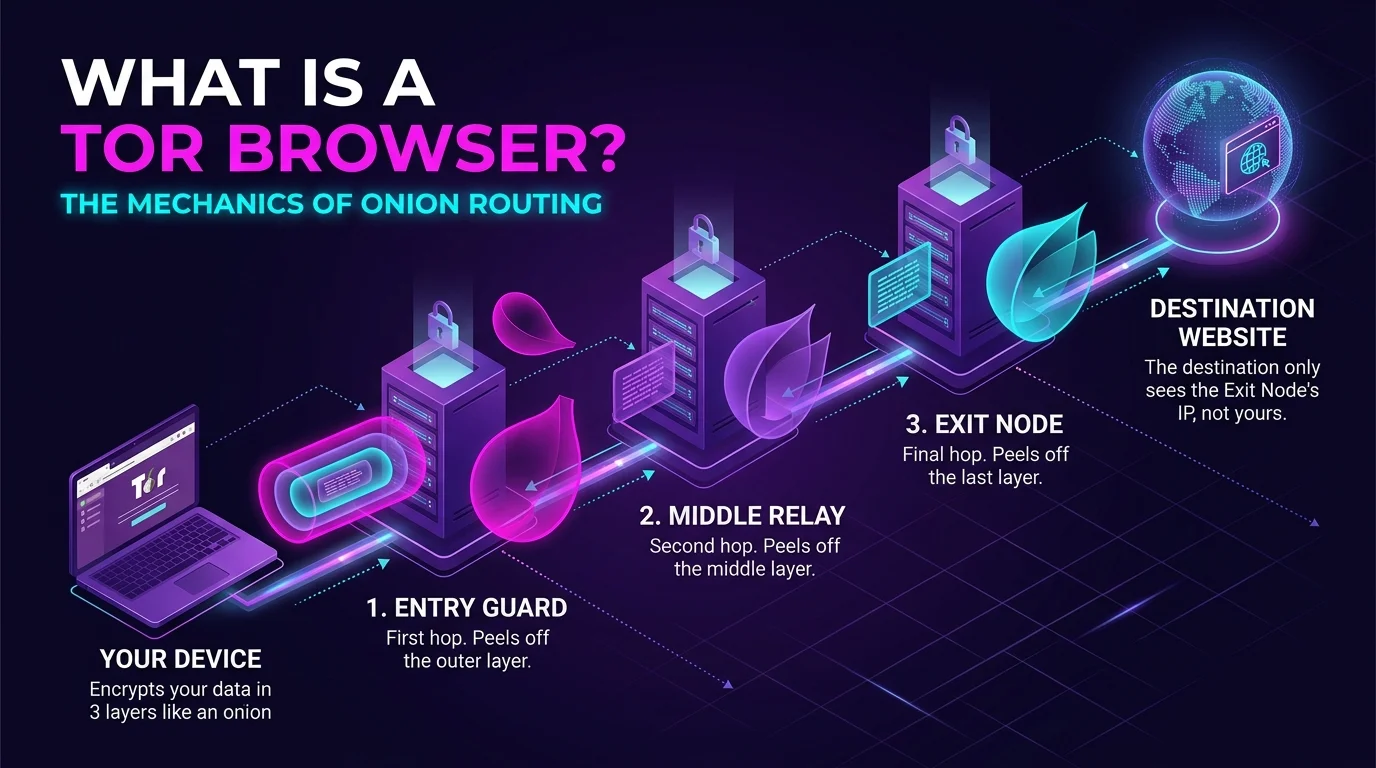
What Is Tor Browser?
Think of Tor Browser as Firefox wearing a disguise. The Tor Project, a US nonprofit, builds it as a privacy hardened version of Firefox. Its job is simple: protect your online anonymity first, and everything else second.
"Tor" stands for The Onion Router. Why onion? Hang tight, because that's coming in the next section.
The Electronic Frontier Foundation called it the gold standard for people who want to reduce their exposure as much as possible. And here's a fun fact: the technology began life inside the US Navy, according to Kinsta's review.
Wild, right?
You might also be wondering whether you should make it your daily driver. Honestly, most people keep it as a second browser for private sessions. If you want to switch things around, here's how to change your default browser in a few clicks.
How Does Tor Browser Work?
Here's the short version. Your connection doesn't go straight to a website. Instead, it bounces through a chain of Tor relays first, and each hop knows only a tiny piece of the puzzle. That's the whole trick behind onion routing.
The Three Relay Circuit
Your Tor circuit uses three relays: a guard, a middle and an exit. Your data is wrapped in three layers of encryption, and each relay peels off one layer as it passes along.
The guard knows who you are. The exit knows where you're going. Nobody in the chain knows both.
Pretty clever, honestly.
Onion Services
Visit a .onion address and your traffic never leaves the Tor network. Journalists and whistleblower platforms lean on these onion services a lot, since the server's location stays hidden too.
Tor Browser Key Facts at a Glance
You asked for the cheat sheet, so here it is. I pulled these from the official and news sources linked throughout this post.
Feature | What you get |
|---|---|
Cost | Free and open source |
Platforms | Windows, macOS, Linux, Android |
iOS | No official version; the Tor Project suggests Onion Browser |
Based on | Firefox ESR 140 (Tor Browser 15.0) |
Latest release I confirmed | 15.0.22, 9 September 2026 |
Anti tracking | Per site isolation and browser fingerprinting protection |
Censorship tools | Tor bridges and pluggable transports |
Releases land every few weeks, so check the official download page for anything newer than 15.0.22.
Tor Browser vs a VPN: What's the Difference?
Short answer: they solve different problems. A VPN is one hop run by one company, so you place all your trust in that provider. Tor, on the other hand, spreads trust across three independent relays.
That said, a VPN is usually faster and handier for streaming. If you're curious how VPN features behave on a home network, read my guides on VPN split tunneling and VPN passthrough.
How to Download and Use Tor Browser Step by Step
Ready to try it? This part is dead simple. Follow these steps in order.
Go to the official site. Download only from torproject.org. Look alike sites exist, so type the address yourself.
Install it. Run the installer like you would for any other app.
Click Connect. On first launch, the browser joins the Tor network for you.
Check the connection. When the browser confirms it's configured to use Tor, you're in.
Browse normally. Resist the urge to install extra add ons, because they can make your fingerprint unique.
Easy.
Need to Beat Censorship?
If your country blocks Tor, use bridges. These are unlisted relays that censors struggle to block. Since version 15.0, Connection Assist can try built in bridges automatically. You can also request one at bridges.torproject.org.
What Tor Browser Can't Do
I won't oversell it, because that's how people get hurt. Tor is powerful, but it isn't magic. It protects your web browsing privacy, yet it can't fix careless habits.
Here's what to keep in mind:
Don't log in to accounts tied to your real name. That links the session straight back to you.
Stick to HTTPS. A malicious exit relay can watch unencrypted traffic. If you want to understand how browsers verify secure sites, see my explainer on the SSL certificate chain.
Skip torrents. The Tor Project says mixing BitTorrent and Tor is never safe.
Keep your device clean. Tor can't stop malware on your computer, such as a keylogger, from recording what you type.
Expect slower speeds. Multi hop routing adds latency.
Is Tor Browser Legal?
In most places, yes. Using it is generally lawful. Some governments, though, restrict censorship circumvention tools, and Russia has been blocking the Tor Project's website. Check your local rules first. I'm not a lawyer, so treat this as general information only.
Why You Should Download Tor Browser Today
Here's my honest pitch. It costs nothing, it takes five minutes, and it gives you anti surveillance protection that regular browsers simply don't offer.
You get:
Tracker blocking through per site isolation.
Fingerprint resistance, so you blend in with other Tor users.
Free access to sites your network may block.
Better still, you're backed by thousands of volunteers and a nonprofit, not an ad company. If it helps you, donate to the Tor Project to keep it running.
Honestly, there's no good reason to wait.
Tor Browser FAQ
What is Tor Browser in simple words? It's a free privacy browser that routes your traffic through three relays to hide your IP address.
Is Tor Browser the same as a VPN? No. A VPN is a single hop run by a company. Tor spreads trust across three independent relays.
Is Tor Browser safe? Yes, as long as you download it from the official site and follow the rules above.
Does Tor Browser work on iPhone? There's no official iOS version. Onion Browser is the recommended option.
Can Tor Browser open blocked websites? Yes. It can help you reach sites your network has blocked.
Final Thoughts
So, what is Tor Browser? It's the simplest way to get real online privacy, and it's free. Download it from the official site, hit Connect, and stay smart about logins and HTTPS.
Go grab it. Your future self will thank you.