An SSL certificate chain is an ordered list of certificates, running from a website's certificate up to a trusted root, that lets a browser verify a site is who it claims to be. It's also called the chain of trust, and it always has three parts: a leaf certificate, one or more intermediate certificates, and a root certificate. If the order is wrong or a link is missing, browsers and tools throw a trust error even when the certificate itself is perfectly valid. This guide breaks down each part, shows you how the chain gets validated, and walks you through building and fixing one yourself.
I'll be honest with you: the first time I looked at a fullchain.pem file, it made zero sense. A wall of base64 text, three or four certificates jammed together, and nobody explaining why. So let's fix that. By the end of this guide you'll know exactly what a certificate chain is, why it exists, how to build one correctly, and how to fix it when it breaks. If you're new to HTTPS in general, it also helps to read up on how an SSL handshake works before diving into the chain itself, and if you're troubleshooting other connection issues along the way, our guide on what a CRC error is covers a different, but related, category of data-integrity errors.
What Is an SSL Certificate Chain, Exactly?
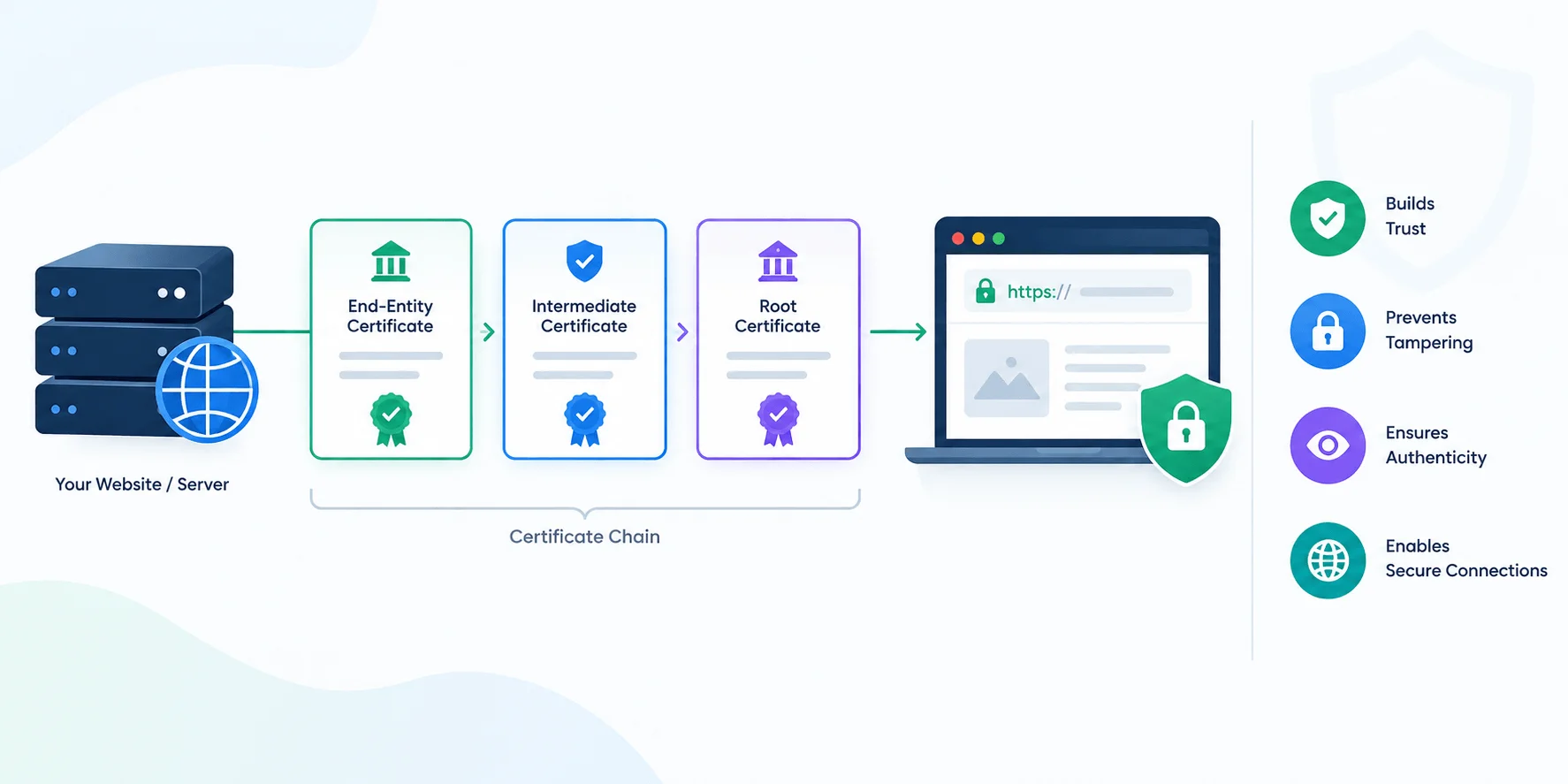
Here's the short version. A certificate chain is a hierarchy of digital certificates where each one vouches for the one below it, starting at a root certificate authority (CA) and ending at your website's certificate.
Think of it like a chain of introductions. You trust your friend. Your friend introduces you to someone new. You don't personally know that new person, but because your friend vouches for them, you extend a little trust. That's basically what's happening between a root CA, an intermediate CA, and your leaf certificate.
Browsers and operating systems ship with a built-in list of trusted root certificates, sometimes called a trust store. Your website's certificate almost never sits in that list directly. Instead, it gets vouched for by an intermediate, which gets vouched for by a root. That whole vouching structure is the chain.
Secondary keywords worth knowing here: public key infrastructure (PKI), digital signature, X.509 certificate, and certificate authority. You'll see these terms constantly once you start reading certificate documentation, so it helps to recognize them early.
The Three Parts of a Certificate Chain
Every chain, no matter which CA issued it, breaks down into the same three layers.
1. Root certificate. This is the anchor. It's self-signed, meaning the CA signs its own certificate, and it's preinstalled in your browser or OS. Root CAs guard these keys aggressively, often keeping them offline in air-gapped vaults, because a compromised root would poison every certificate that traces back to it.
2. Intermediate certificate. This sits between the root and your leaf certificate. CAs almost never sign your certificate with their root key directly. They use an intermediate instead, which limits the blast radius if something ever goes wrong. If an intermediate gets compromised, only the certificates under that intermediate are affected, not the whole root.
3. Leaf certificate (also called the server or end-entity certificate). This is your certificate, the one issued specifically for your domain. It's what you install on your web server, and it's the one your visitors actually see when they click the padlock icon.
Root vs. Intermediate vs. Leaf Certificate: Quick Comparison
Certificate Type | Who Signs It | Where It's Stored | If Compromised |
|---|---|---|---|
Root certificate | Self-signed by the CA | Preinstalled in browser/OS trust store | Every certificate under it becomes untrusted |
Intermediate certificate | Signed by the root (or another intermediate) | Sent by your server during the handshake | Only certificates issued under that intermediate are affected |
Leaf certificate | Signed by an intermediate | Installed on your web server | Only that specific domain is affected |
Why Does a Certificate Chain Even Need Intermediates?
You might be wondering why CAs don't just sign everything with the root key and skip a step. Fair question, and the answer comes down to risk management more than anything technical.
Keeping the root key offline and rarely used means it's much harder to steal or misuse. Intermediates act as a buffer. They do the day-to-day signing work while the root stays locked away, safe from the kind of daily exposure that increases the odds of a breach. If you've ever heard the phrase "defense in depth" in a security context, this is a textbook example of it.
There's also a practical benefit for you as a site owner. If a CA ever needs to rotate an intermediate, they can do it without touching the root or forcing every certificate on the internet to be reissued at once. Smaller blast radius, easier recovery, less chaos.
This intermediate-heavy model is also why a small number of CAs now issue the vast majority of certificates online. According to Network Solutions' 2026 SSL/TLS statistics, six certificate authorities are responsible for roughly 90% of all SSL certificates issued today, with Let's Encrypt alone accounting for the largest share. Automated, intermediate-based issuance is a big part of what makes that scale possible.
How Certificate Chain Validation Works During the TLS Handshake
This is where things click for most people, so stick with me. When your browser connects to a website over HTTPS, a process called the TLS handshake kicks off, and validating the certificate chain is a core part of it.
Here's what actually happens, step by step:
The server presents its certificates. Your web server sends the leaf certificate plus any intermediate certificates in the chain. It does not send the root. Your browser already has that stored locally, so re-sending it would just waste bytes.
The browser checks the leaf certificate. It looks at the hostname, the validity dates, and who supposedly signed it.
The browser verifies the signature going upward. It checks that the leaf was actually signed by the intermediate, using the intermediate's public key. Then it checks that the intermediate was signed by the next certificate up the chain.
The browser reaches a trusted root. Once it lands on a certificate already sitting in its trust store, the chain is considered anchored.
The browser confirms nothing is broken along the way. No expired certificates, no revoked certificates, no name mismatches.
Every handshake also includes a fresh random value called a nonce, which stops an attacker from replaying a recorded handshake. If every step checks out, you get the padlock and an encrypted connection. If even one link is missing or wrong, you get a scary certificate warning instead.
Why Order Matters in a Certificate Chain File
When you're building a chain file manually, order isn't optional, it's mandatory. The convention is: leaf certificate first, followed by intermediates, from the one that signed your leaf up toward (but not including) the root.
Get this backwards, and validation breaks. The client is literally walking up a signature ladder, checking each rung against the one above it, so if the rungs are out of sequence, it can't complete the climb.
Step-by-Step: How to Build and Check Your Certificate Chain
Here's a practical walkthrough you can actually follow, whether you're setting up a new certificate or troubleshooting an existing one.
Step 1: Get your certificate files from your CA. Most CAs, including Let's Encrypt, give you a leaf certificate and a separate intermediate bundle. Save both.
Step 2: Combine them in the correct order. On Linux or macOS, you can concatenate the files with a simple command:
cat leaf.crt intermediate.crt > fullchain.crt
The leaf certificate goes first, the intermediate (or intermediates) follow. Never append the root yourself.
Step 3: Install the combined chain on your server. Point your web server's SSL configuration (Nginx, Apache, or whatever you're running) at the combined chain file, not just the standalone leaf certificate.
Step 4: Restart your web server. Configuration changes to SSL settings usually require a reload or restart to take effect.
Step 5: Test the chain with a real tool. Don't just eyeball it in your browser. Browsers are forgiving and sometimes cache intermediates from previous visits, which can mask a real problem. Instead, run:
curl -v https://yourdomain.com
If you see "SSL certificate verify ok," you're set. If you see "unable to get local issuer certificate," an intermediate is missing.
Step 6: Use an online SSL checker for a second opinion. Tools like Qualys SSL Labs or a dedicated certificate chain analyzer will grade your entire setup and flag chain issues clearly, including ones that curl might not catch.
Common Certificate Chain Mistakes (and How to Avoid Them)
The table below covers the mistakes that trip people up most often, along with how to spot each one and how to fix it.
Mistake | Symptom | Fix |
|---|---|---|
Forgetting the intermediate certificate | Site loads fine in Chrome but fails in curl, mobile apps, or API clients | Install the full chain (leaf + intermediates), not just the leaf certificate |
Including the root certificate in the chain file | Slightly larger handshake; occasional confusion in strict clients | Remove the root; it's already in the client's trust store |
Wrong certificate order | Chain validation fails even though every certificate is individually valid | List the leaf first, then intermediates in signing order, never the root |
Letting a certificate expire quietly | Chain breaks even if the leaf is still valid | Set up automated renewal and monitor every certificate in the chain, not just the leaf |
Only testing in one browser | "Works for me" but fails for other visitors | Test with curl, an SSL checker, and at least one mobile device |
If you run into any of these, and your certificate issues turn out to be a symptom of a bigger server misconfiguration, it's also worth ruling out backend problems like slow MySQL queries, since a struggling server can sometimes surface as intermittent HTTPS failures too.
Frequently Asked Questions About SSL Certificate Chains
Do I need to include the root certificate in my chain?
No. Your browser or OS trust store already has it. Including it just adds unnecessary weight to the handshake.
Why does my site work in Chrome but fail in curl?
This almost always means a missing intermediate certificate. Chrome sometimes fills in gaps automatically; command-line tools generally don't.
How many intermediate certificates can a chain have?
It varies by CA. Some chains have just one intermediate, others have two or more, depending on how the CA structures its hierarchy.
What happens if an intermediate certificate expires?
The whole chain breaks, even if your leaf certificate is still valid. Intermediates need monitoring just like leaf certificates do.
Is SSL the same thing as TLS?
Not technically. TLS (Transport Layer Security) replaced the older SSL protocol years ago, but the term "SSL certificate" stuck around out of habit, and the two names get used interchangeably in casual conversation.
Wrapping Up
A certificate chain isn't complicated once you see the pattern: leaf, intermediate, root, each one vouching for the next. You now know why intermediates exist, how a browser walks the chain during a handshake, and how to build, install, and troubleshoot one yourself.
If you take one thing away from this guide, let it be this: always test your chain with a real tool like curl or an SSL checker, not just your browser's padlock icon. That single habit will save you from the most common HTTPS headache out there. For more on keeping your site secure beyond just certificates, our guide on what a keylogger is is a good next read on the broader security side of running a website.