Quick answer: VPN split tunneling is a feature that lets you route some of your internet traffic through an encrypted VPN tunnel while the rest connects directly to the internet using your normal connection. Instead of forcing 100% of your traffic through one encrypted pipe, you get to choose — app by app, or route by route — what gets protected and what doesn't. It's great for speed, local device access, and bandwidth, but it comes with real security trade-offs you need to understand before turning it on.
Now let's get into the details.
If you've ever wondered what is VPN split tunneling and whether you actually need it, you're in the right place. I've spent a good chunk of time digging through how VPNs actually route traffic, and I want to walk you through it in plain English — no jargon-soup, just the stuff that actually matters. By the end of this guide, you'll know exactly how VPN split tunneling works, when to use it, and how to set it up safely.
Let's get into it.
What Is VPN Split Tunneling, Really?
Okay, so here's the deal.
Normally, when you connect to a VPN, every single byte of your traffic gets shoved through one encrypted tunnel. That's the default. That's how most people think VPNs work.
But split tunneling flips that script a bit.
It lets you divide your internet traffic into two separate paths instead of forcing everything through the same pipe. One path goes through the encrypted VPN tunnel — so anything you access there sees the VPN server's IP address and virtual location. The other path? It just goes straight to the internet, using your real, everyday connection.
Why would you want that split at all, you ask?
Because sometimes you don't need everything encrypted. Maybe you want your banking app to run on your normal network (banks hate VPNs, by the way) while your torrenting or work traffic stays wrapped up tight. That's the whole idea.
Think of it like having two doors out of your house — one that goes through a security checkpoint, and one that doesn't. You decide which stuff walks out which door.
Related reading: if you're securing your home network in general, check out our guide on how to improve your Wi-Fi signal and how to change your Wi-Fi password for a stronger foundation before layering on VPN protection.
How Does Split Tunneling Actually Work Under the Hood?
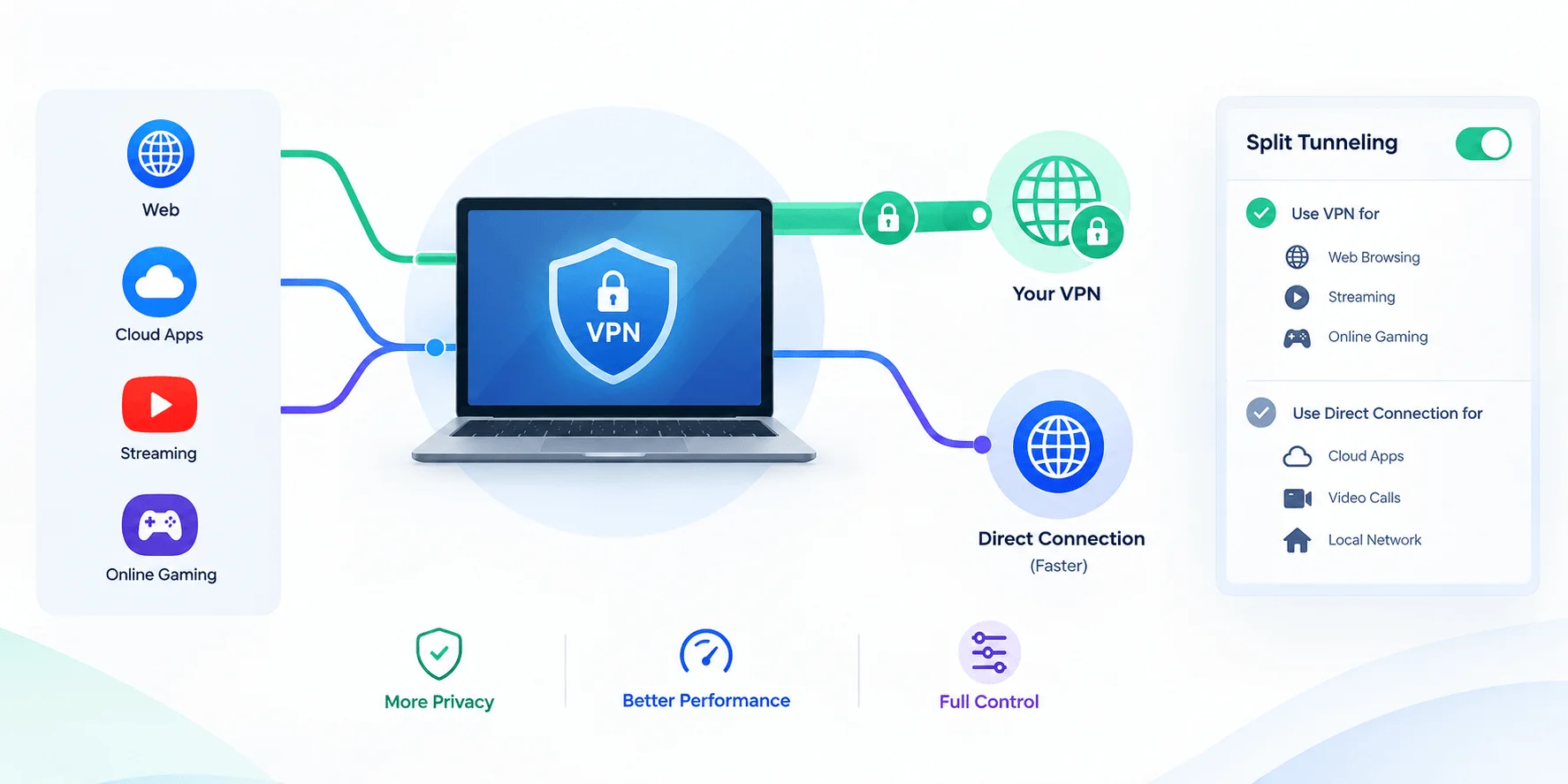
Before you set anything up, it helps to actually understand the mechanics — trust me, this part isn't as scary as it sounds, and it'll make the setup steps later feel way more intuitive.
Here's the short version.
When your computer sends a packet of data through a VPN protocol, the VPN client encrypts that packet and slaps a new header on it. Then it ships the whole thing off to the VPN host, which strips the header, decrypts the original packet, and forwards it to wherever it was actually headed.
That's a normal, full-tunnel VPN.
With split tunneling, though, your device checks each connection against a set of rules first. If the traffic matches a rule (say, "Netflix app" or "corporate.company.com"), it goes into the tunnel. If it doesn't match, it skips the tunnel completely and travels over your regular connection — no encryption, no IP masking, nothing.
Simple concept. A little more complex once you're actually configuring it.
The Three Main Types of Split Tunneling
You'll usually run into one of three flavors, and honestly, knowing the difference will save you a headache when you're picking a VPN provider.
App-based split tunneling
This is probably the one you'll use most. You just pick which apps skip the VPN, and everything else stays encrypted. NordVPN's browser extension does exactly this — you tell it "don't touch Chrome" and it leaves Chrome alone.
Route-based split tunneling
Here, traffic gets divided by predefined network routes — these can be static (you set them manually) or dynamically learned by the network itself.
Policy-based split tunneling
This one's more of an enterprise thing. A network admin sets up policies, and routing follows those rules automatically. You'll see this a lot in corporate VPN environments, often tied into a broader zero trust network access (ZTNA) strategy — similar in spirit to other endpoint security concerns like what a keylogger is and how it works.
Why Would You Actually Use Split Tunneling? (Real Use Cases)
Now that you get the mechanics, let's talk about why this feature even exists — because on paper it sounds neat, but the real value shows up in specific everyday situations.
Here are the big ones.
1. You want faster streaming or gaming
VPNs add latency. That's just physics — your data's taking a longer road trip. If you're gaming or streaming, split tunneling lets that traffic skip the tunnel and stay fast, while your more sensitive stuff (say, messaging apps) stays encrypted.
2. You're working remotely and need local devices
This one's huge for remote workers. If you're connected to a corporate VPN, you often lose access to your local network printer or NAS device. Split tunneling fixes that — you keep corporate traffic encrypted while your local devices stay reachable.
3. You're traveling and want the best of both worlds
Say you're abroad and want to watch your home Netflix library through the VPN, but you also want to browse local sites (restaurants, maps, whatever) without funky geo-redirects. Split tunneling handles that gracefully.
4. Microsoft literally recommends it for Teams and Office 365
Not kidding — Microsoft officially recommended VPN split tunneling for Teams and Office 365 back in March 2020, specifically because routing all that real-time traffic through a VPN tunnel tanks call quality. As remote and hybrid work has only grown since then, this recommendation has become even more relevant heading into 2026, with more organizations formalizing split-tunneling policies as part of their remote access VPN strategy.
Is Split Tunneling Safe? Let's Be Honest About the Risks
Here's where I want to slow down, because most articles gloss right over this part — and honestly, this is the section that actually matters if you're going to use split tunneling for anything work-related.
Split tunneling is not free of trade-offs. At all.
The Core Risk: Unencrypted, Exposed Traffic
By design, anything that skips the VPN tunnel is completely unencrypted and exposed to your regular network. That means your ISP, your network operator, or anyone snooping on public Wi-Fi can potentially see that traffic.
If you're on split tunneling and browsing something sensitive on the "open" side of the tunnel, you've basically lost the whole point of using a VPN for that activity.
It Can Bypass Your Company's Security Stack Entirely
This is the one that keeps IT security teams up at night.
When traffic bypasses the VPN, it also bypasses the corporate firewall, endpoint detection and response tools, antimalware systems — basically everything a company relies on to catch threats. That data becomes invisible to the people whose job is to protect it.
Pretty concerning when you think about it that way, right?
DNS Leaks Are a Real Thing
Depending on how it's implemented, split tunneling can expose your DNS query destinations, which creates a blind spot for monitoring — and, worse, a potential channel malware can exploit to phone home without anyone noticing. A DNS leak is one of the most common and least visible risks of a poorly configured split tunnel.
Malware and Phishing Exposure
When you bypass the VPN for general browsing, you also lose whatever protective layer the VPN (or the corporate network behind it) was providing against phishing and malware. That's just how it goes — BlackFog's breakdown of split tunneling risks covers this pretty thoroughly if you want the deep dive.
If you're already thinking about endpoint threats, it's worth also reading up on what a keylogger is — a common piece of malware that becomes a much bigger risk on unencrypted, non-VPN traffic
Misconfiguration Is Easier Than You'd Think
Here's a sneaky one. If app-based rules get set up wrong, a company could accidentally allow unencrypted access to internal databases from outside networks — without anyone realizing it until something goes wrong.
So yeah. Powerful feature. Also a feature that punishes carelessness.
Who Should NOT Use Split Tunneling
Quick gut-check before you turn this on. Skip split tunneling if:
You regularly handle regulated data under GDPR, HIPAA, or similar frameworks
You're connecting over public or unsecured Wi-Fi on a regular basis
Your organization mandates full-tunnel VPN for compliance reasons
You're not confident configuring app/route rules correctly (misconfiguration is the #1 cause of split-tunneling incidents)
If any of those apply, full-tunnel VPN is the safer default.
How to Set Up Split Tunneling: A Step-by-Step Guide
Alright, let's actually get you set up. The exact menus will vary a bit by provider, but the overall flow is basically the same everywhere.
Step 1: Pick a VPN that actually supports split tunneling
Not every VPN has this feature — and some only offer it on certain platforms (Windows and Android usually get it first; macOS support is often more limited or still experimental).
Step 2: Open your VPN app's settings menu
Look for something labeled "Split Tunneling," "App Exclusions," or "Bypass VPN." It's usually tucked into an Advanced or Connection settings tab.
Step 3: Choose your split tunneling mode
You'll typically pick between:
Excluding specific apps from the VPN (most common)
Including only specific apps in the VPN
Excluding specific IPs or URLs
Step 4: Select your apps or routes
Add whatever you want to bypass — gaming clients, banking apps, streaming services, whatever fits your use case.
Step 5: Apply and reconnect
Most VPN clients need a reconnect (not just an "apply") for split tunneling changes to fully kick in. Don't skip this — I've seen people troubleshoot for twenty minutes because they forgot this one step.
Step 6: Test it
Check your IP address (through a simple "what's my IP" search) while running both a tunneled app and a bypassed app. If it's working, you should see two different IPs depending on which app you're checking.
Split Tunneling vs. Full Tunneling: Which One Should You Use?
You might be sitting here thinking, "okay, but which one do I actually need?" Here's a side-by-side comparison to make the decision easier:
Factor | Split Tunneling | Full Tunneling |
|---|---|---|
Speed | Faster (less traffic encrypted) | Slower (all traffic encrypted) |
Security level | Partial — only tunneled traffic protected | Maximum — everything protected |
Best for | Gaming, streaming, local device access | Sensitive data, compliance, public Wi-Fi |
Firewall/DLP visibility | Bypassed for excluded traffic | Full visibility for IT/security teams |
Setup complexity | Moderate (rule configuration needed) | Simple (default VPN behavior) |
Risk of misconfiguration | Higher | Lower |
Compliance fit (GDPR/HIPAA) | Requires careful policy control | Generally safer default |
Go with full tunneling if you're handling sensitive data regularly, on public Wi-Fi often, or bound by compliance rules.
Go with split tunneling if you want better speeds, need local device access, want to conserve bandwidth, and are deliberate about what bypasses the tunnel.
Frequently Asked Questions
Does split tunneling slow down my internet speed?
No — it typically speeds things up for the apps excluded from the VPN, since that traffic skips encryption overhead entirely.
Is split tunneling illegal?
No. It's a legitimate, widely offered VPN feature. Legality depends entirely on what you're doing with your internet traffic, not on the feature itself.
Does split tunneling protect me from hackers?
Only partially. Traffic routed through the VPN is protected; traffic that bypasses it is not, and is exposed the same way a normal, non-VPN connection would be.
Can split tunneling cause DNS leaks?
Yes, depending on implementation. This is one of the most common configuration issues — always test for leaks after setup using a DNS leak test tool.
Which VPNs support split tunneling in 2026?
Most major providers — including NordVPN, ProtonVPN, and others — support at least app-based split tunneling on Windows and Android, with macOS support still catching up in several cases.
Final Thoughts
So, is VPN split tunneling worth using?
Honestly — for most everyday users, yes, with some care. It's a genuinely useful feature that solves real problems: speed, local access, bandwidth, and flexibility. But it's not a "set it and forget it" thing. You need to be intentional about what you're excluding from that encrypted tunnel, because everything outside it is fair game for your ISP, your network, or anyone else paying attention.
If you're just streaming and gaming, split tunneling is probably a no-brainer.
If you're handling sensitive corporate data, though, you'll want a much more careful, policy-driven approach — or just stick with full-tunnel VPN and eat the latency hit.
Either way, now you know exactly how it works, why people use it, and how to set it up the right way.