Hardware accelerated GPU scheduling (HAGS) is a Windows 10 and Windows 11 feature that moves GPU task scheduling from your CPU to a dedicated processor on your graphics card. For most modern PCs, you should leave it ON. It's the Windows 11 default, it's required for NVIDIA DLSS Frame Generation, and its effect on average FPS is usually small.
Here's the deal:
There's a tiny switch buried in your Windows settings called hardware accelerated GPU scheduling.
Some gamers swear by it. Others blame it for stutters.
So who's right?
In this guide, I'll show you exactly what HAGS does, which GPUs support it, how to enable it, and when you should turn it off.
Let's dive right in.
What Is Hardware Accelerated GPU Scheduling?
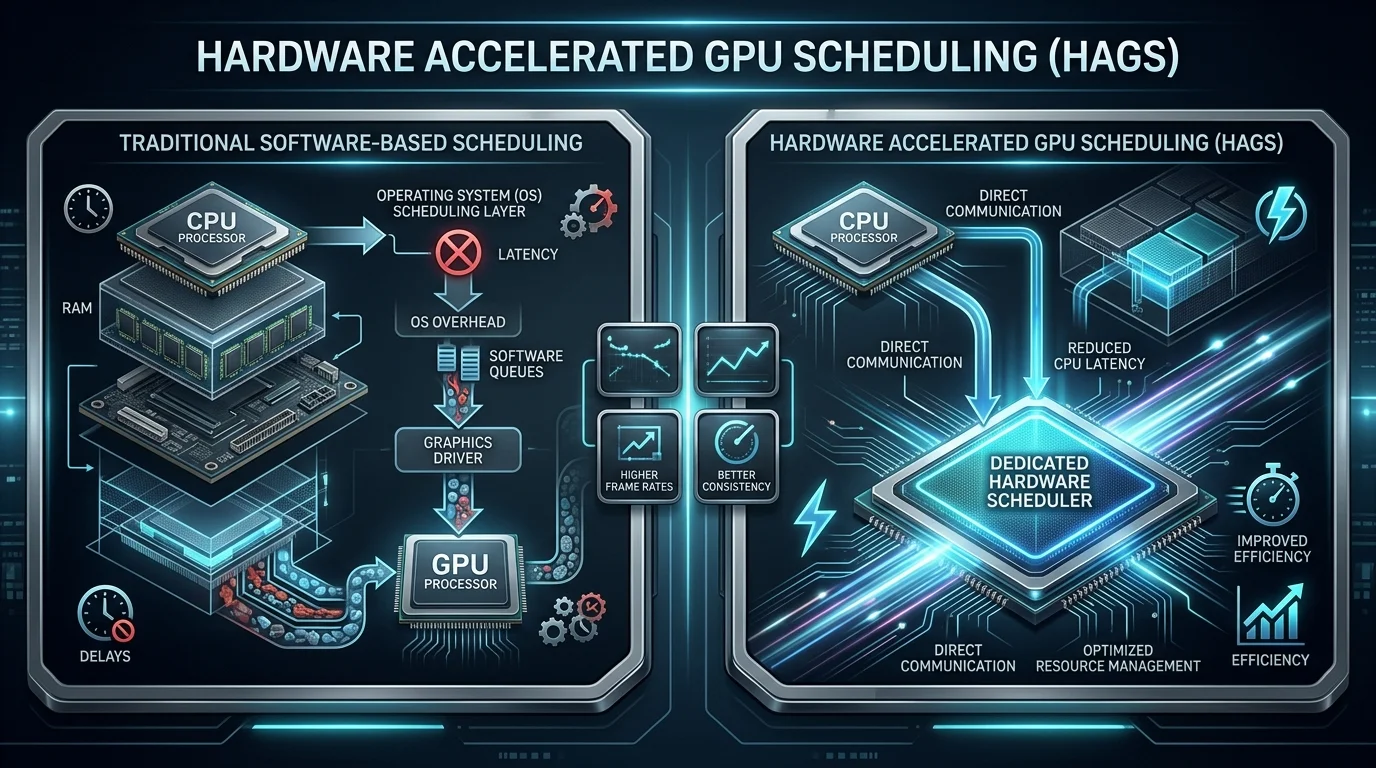
First things first: what are we actually talking about? Hardware accelerated GPU scheduling is a Windows feature that changes who manages your graphics card's to do list. Normally, your CPU acts as the traffic cop, deciding which tasks reach the GPU and when. With HAGS on, a dedicated scheduling chip on the graphics card takes over most of that work. It doesn't change how a game draws frames. Instead, it changes the plumbing underneath. And as you'll see, that plumbing matters far more in 2026 than it did when Microsoft launched the feature in 2020.
How the Old GPU Scheduler Worked
Let me back up for a second, because a bit of history helps here. According to TechPowerUp's breakdown of Microsoft's announcement, GPU scheduling first arrived with WDDM 1.0 in Windows Vista.
Before that? Apps just flooded the driver with work.
The Windows Display Driver Model (WDDM) scheduler fixed the chaos, but it ran on your CPU. That meant extra overhead on every frame.
What Changes When HAGS Is On
Here's where it gets interesting. Microsoft's DirectX Developer Blog explains that Windows still controls priority between apps, while high frequency jobs like context switching move to the GPU's own scheduling processor.
In plain English:
Your CPU does less busywork.
Your GPU manages its own queue.
You get reduced CPU overhead and potentially lower input latency.
HAGS by the Numbers
Numbers make everything clearer, so I pulled the key figures into one place. These facts come from first party documentation and independent testing labs, not forum guesswork. They cover when HAGS launched, which drivers enabled it, and how it has actually performed in real benchmarks. As a result, you can quickly see why the feature is both important and often misunderstood. Bookmark this section if you want the fast version.
2020: HAGS debuted in the Windows 10 May 2020 Update (version 2004) with WDDM 2.7.
451.48 and 20.5.1: The first NVIDIA and AMD driver versions required, per GamersNexus.
23.12.1: The AMD Adrenalin driver that brought HAGS to RX 7000 cards in December 2023, per Neowin.
26 games: Tested with HAGS on vs off by BabelTechReviews on an RTX 3080.
About 20%: The drop in DaVinci Resolve's "GPU Effects" subscore measured by Puget Systems.
Up to 10%: The After Effects gain reported by PCWorld.
HAGS System Requirements
Before you hunt for the toggle, you need to know whether your PC qualifies. This is where a lot of people get stuck. The setting only appears when three things line up: a supported Windows version, a GPU with scheduling hardware, and a compatible graphics driver. Microsoft ties the feature to WDDM 2.7 capability flags such as HwSchSupported and HwSchEnabled. On top of that, each GPU maker rolled out support on its own timeline. Here's the full picture at a glance.
GPU Support Comparison Table
GPU Brand | Supported Cards | Minimum Requirement | Source |
|---|---|---|---|
NVIDIA | GTX 10 series (Pascal) and newer, including RTX 40 and 50 series | Release 450 driver or newer | TechPowerUp |
AMD | RX 7900, 7800 and 7700 series | Adrenalin 23.12.1 on Windows 11 22H2 or newer | Tom's Hardware |
Intel | Arc B Series only (not A Series) | Windows 11 22H2 or newer | Intel Support |
Quick note on AMD: the RX 5600 and RX 5700 got early beta support back in 2020, but AMD's official 2023 rollout focused on RDNA 3 cards.
And what if you're on integrated graphics? Our Intel Iris Xe Graphics guide explains what that chip can and can't handle, so you know whether a dedicated GPU is worth it.
How to Enable Hardware Accelerated GPU Scheduling in Windows 11
Now for the fun part. Turning on hardware accelerated GPU scheduling takes less than a minute, and you don't need any special tools. That said, I strongly recommend updating your GPU driver first, because an outdated driver is the number one reason the toggle goes missing. On most Windows 11 machines, HAGS is already on by default. Still, it's worth checking, especially after upgrading from Windows 10 or doing a clean driver install.
Open Settings and go to System > Display > Graphics.
Click "Change default graphics settings." Microsoft Learn confirms this path.
Toggle "Hardware-accelerated GPU scheduling" to On.
Restart your PC. The change only kicks in after a reboot.
Pro tip: while you're already in Display settings, it's the perfect moment to set up two monitors if you game on one screen and stream or chat on another.
The Registry Method (Advanced Users Only)
Can't see the toggle? There's a workaround, but tread carefully. Open Registry Editor, go to HKEY_LOCAL_MACHINE\SYSTEM\CurrentControlSet\Control\GraphicsDrivers, set HwSchMode to 2, and reboot, as this guide outlines.
Back up your registry first. Seriously.
Why Is the HAGS Toggle Missing?
This is one of the most searched HAGS questions, so let's fix it fast. If the option doesn't show up in your graphics settings, Windows is telling you something specific. Usually, either your hardware lacks a scheduling processor or your driver doesn't expose support. Fortunately, the causes are easy to narrow down. Work through the checklist below, and you'll know within minutes whether you can use the feature or not.
Unsupported GPU: For example, Intel Arc A Series cards or older AMD cards.
Outdated driver: Microsoft notes you need a driver supporting WDDM 2.7 or higher.
Old Windows build: You need Windows 10 version 2004 or later, and AMD RX 7000 support requires Windows 11 22H2 or newer. If you've paused updates, our Windows Update guide shows you how to take back control of when updates install.
Does HAGS Actually Improve Performance?
This is the million dollar question. I dug through years of independent benchmarks so you don't have to. And honestly? The truth is less exciting than the hype. In most games, HAGS won't hand you a massive FPS boost. Its value shows up in smaller ways: slightly lower overhead, sometimes steadier frame times, and access to newer features. Results also vary by CPU, GPU, driver, and app. So let's look at gaming and creative work separately.
Gaming Benchmarks
When GamersNexus tested it, The Division 2 showed nearly identical averages on a CPU bottlenecked system, whether HAGS was on or off.
Likewise, BabelTechReviews' 26 game Windows 11 test followed earlier Windows 10 results that were inconsistent.
Bottom line? Expect small differences, not miracles.
Content Creation Performance
Creators, pay attention here. Puget Systems saw no meaningful change in Photoshop or Premiere Pro, but a sizable hit in DaVinci Resolve's GPU Effects subscore.
Meanwhile, PCWorld reported roughly 5% gains in Blender GPU rendering but about a 5% loss in V-Ray GPU.
So test your own workflow. And if you're shopping for an editing machine, check our roundup of the best laptops for video editing to pick a GPU that handles both HAGS and heavy timelines.
HAGS and DLSS Frame Generation: The Real Game Changer
Here's the part most guides bury, and it's the biggest reason HAGS matters in 2026. If you own a modern NVIDIA card, this setting isn't optional anymore. DLSS Frame Generation uses AI to insert extra frames between rendered ones, which dramatically smooths gameplay. However, it has a hard dependency on hardware accelerated GPU scheduling. In other words, if HAGS is off, one of the headline features you paid for simply won't turn on.
CD PROJEKT RED's support page states that DLSS Frame Generation requires an RTX 40 series card plus HAGS enabled in Windows.
Newer cards follow the same rule. One RTX 50 series owner found that DLSS 4 Multi Frame Generation wouldn't work until HAGS was switched on.
Should You Turn HAGS On or Off?
So, what should you actually do? My answer is refreshingly simple. For most people on a modern GPU with current drivers, leave HAGS on. It's the Windows 11 default for a reason, and it unlocks frame generation. There are a few exceptions, though. If you notice stuttering, VR hitching, or slower renders in a specific app, switch it off and compare. Just test properly with a frame time overlay instead of trusting one FPS number.
Your Setup | Recommendation | Why |
|---|---|---|
NVIDIA RTX 40 or 50 series | ON | Required for DLSS Frame Generation |
AMD RX 7000 or Intel Arc B Series | ON | Supported; turn off only if issues appear |
Video editors (e.g., DaVinci Resolve) | Test both | Some GPU effects run slower |
Old GPU or outdated driver | Update first | Toggle may be missing or unstable |
Frequently Asked Questions About HAGS
Still have questions? You're not alone. These are the questions people ask most often about hardware accelerated GPU scheduling, answered in plain language. I kept each answer short so you can find what you need quickly. If your question isn't here, drop it in the comments and I'll add it in the next update.
What does hardware accelerated GPU scheduling do?
It moves GPU task scheduling from your CPU to a dedicated processor on the graphics card, which reduces CPU overhead.
Does HAGS increase FPS?
Usually only slightly, if at all. Independent tests show small, game dependent differences.
Is HAGS on by default in Windows 11?
Yes, on supported hardware, according to CD PROJEKT RED's support documentation.
Is HAGS required for DLSS 3 and DLSS 4?
Yes. DLSS Frame Generation and Multi Frame Generation need HAGS enabled.
Does Intel Arc support HAGS?
Only the Arc B Series on Windows 11 22H2 or newer. The A Series doesn't support it.
Can HAGS cause stuttering?
It can on some systems, especially with older drivers. If it does, turn HAGS off and retest.
Should video editors enable HAGS?
Test both ways. Puget Systems found some DaVinci Resolve GPU effects ran noticeably slower with it on.
The Bottom Line on Hardware Accelerated GPU Scheduling
Let me wrap this up. Hardware accelerated GPU scheduling isn't a magic FPS button, but it's no longer a setting you can ignore. It trims CPU overhead, it's the Windows 11 default, and most importantly, it unlocks DLSS Frame Generation on modern NVIDIA cards. So if your GPU supports HAGS, keep it on. If it doesn't, that's a clear sign your hardware is falling behind. That's exactly why I recommend upgrading to an NVIDIA RTX 40 series or RTX 50 series GPU, which gives you HAGS, Frame Generation, and years of driver support in one package.
Now I'd like to hear from you:
Do you keep HAGS on or off?
Let me know in the comments below.