What is a GPU? A GPU (graphics processing unit) is a processor with hundreds to thousands of small cores that run many calculations at once. It was built to draw 3D graphics, and it now also powers AI, video editing, and scientific simulation. A CPU, by contrast, handles a few complex tasks one after another.
I get asked about this a lot. And most answers are either vague or painfully technical.
So here's my promise: you'll understand what a GPU does, how it differs from a CPU, and how to check or choose one. All in plain English.
Let's dive in.
What Is a GPU? The Simple Definition
A graphics processing unit is a specialized circuit that speeds up graphics and image processing, as IBM explains. Think of it as a teammate for your computer's main processor. It takes the visual heavy lifting so everything else stays smooth. That one idea explains almost everything in this guide, so let's unpack it with a few more details.
The magic is in the core count. A GPU packs hundreds to thousands of smaller cores, according to Arm.
Each core is simple. Together, they chew through huge piles of data at once. That's called parallel processing.
It started with pictures. Today, GPUs also run artificial intelligence, scientific simulation, and video rendering.
GPU vs CPU vs TPU vs NPU: What's the Difference?
A GPU isn't just a better CPU, and it isn't the only AI chip either. A CPU handles general work, a GPU does parallel math in bulk, a TPU is Google's custom chip for machine learning, and an NPU is a low-power AI chip. They're built for different jobs, so most computers use several together. Here's how they compare.
Chip | Stands for | Built for | Key trait |
|---|---|---|---|
CPU | Central processing unit | General-purpose tasks and system control | A few powerful cores, mostly one task after another |
GPU | Graphics processing unit | Graphics and parallel math | Hundreds to thousands of simple cores working at once |
TPU | Tensor processing unit | Machine learning workloads | Custom-developed ASICs from Google |
NPU | Neural processing unit | AI tasks | Similar parallel work with lower power use and a smaller footprint than GPUs |
Sources: IBM, NVIDIA documentation, Google Cloud TPU docs, IBM on NPUs.
Here's an easy way to picture it. A CPU is a head chef who can cook anything, one complicated recipe at a time. A GPU is a kitchen with a thousand line cooks who each chop onions, all at the same moment.
In real life, they team up. The CPU sends instructions, and the GPU takes the heavy parallel part. NVIDIA calls this GPU-accelerated computing. IBM adds that NPUs complement CPUs and GPUs rather than replacing them.
GPU vs Graphics Card: Are They the Same Thing?
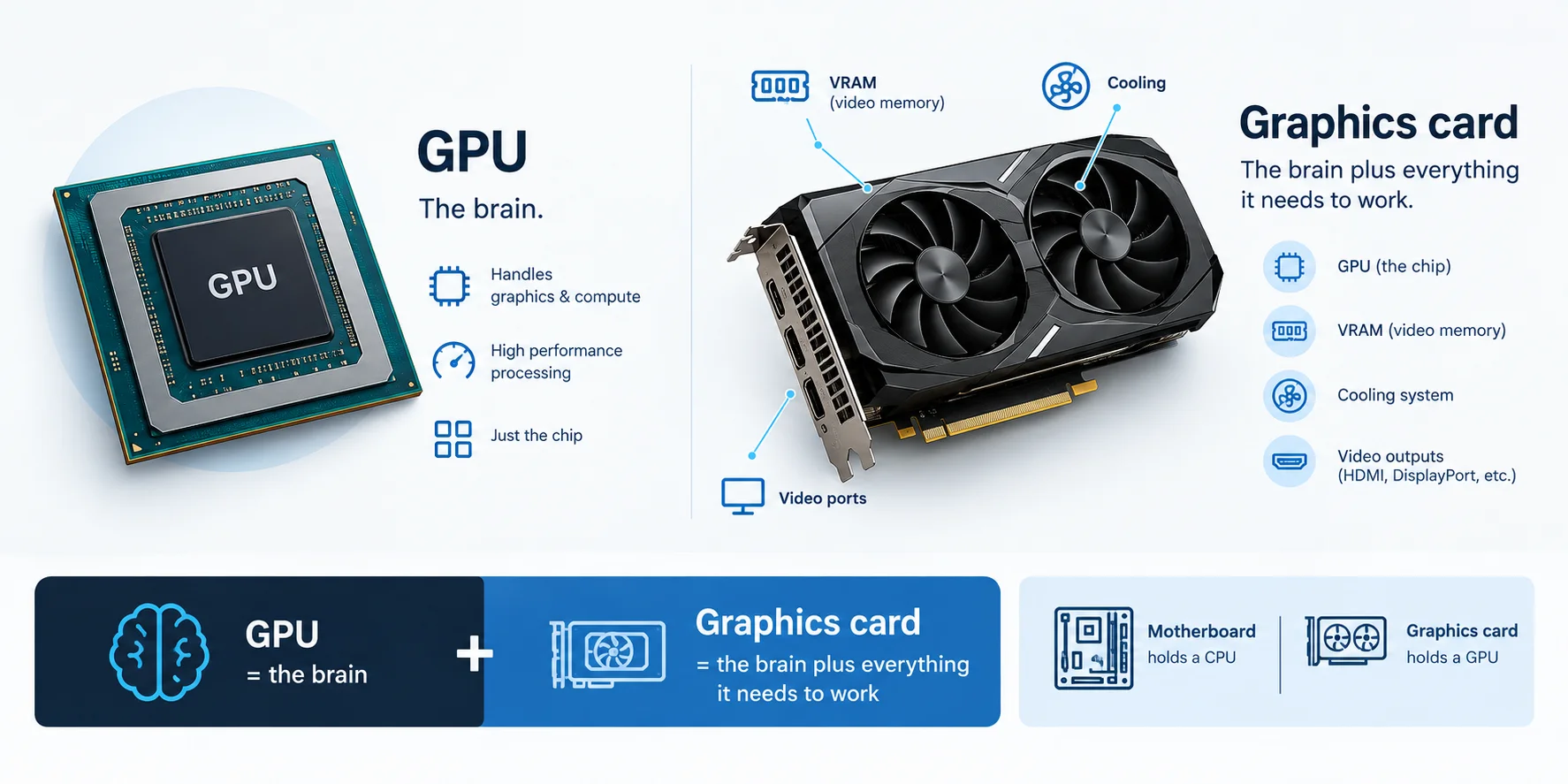
No, they aren't the same thing, even though people use the words interchangeably. The GPU is the chip. The graphics card (or video card) is the whole add-in board built around it. Mixing them up can lead you to misread a spec sheet or buy the wrong part, so let me separate them clearly in a few lines.
The board also carries video memory (VRAM), cooling, and the ports for your monitor, as Lenovo describes. Intel uses a handy comparison: a motherboard holds a CPU, and a graphics card holds a GPU.
Here's the quick rule:
GPU = the brain
Graphics card = the brain plus everything it needs to work
Integrated vs Dedicated GPU: Which One Do You Have?
An integrated GPU sits inside your processor, while a dedicated GPU (also called discrete graphics) is a separate chip with its own memory. That single difference shapes your performance, battery life, and budget. It's also why one laptop runs games smoothly while another stutters on the same title. Here's the side-by-side comparison, based on Intel's support page.
Feature | Integrated GPU | Dedicated GPU |
|---|---|---|
Location | Built into the processor | Separate chip |
Memory | Shares system memory with the CPU | Has its own memory |
Power and heat | Lower | Higher |
Performance | Lower | Higher |
Common in | Laptops and small form factor PCs | Desktop PCs (also some laptops) |
So which should you pick?
If you mostly browse, stream, and write documents, integrated graphics is usually plenty. If you game, edit video, or build 3D models, a dedicated GPU is the better fit.
Curious how a modern integrated chip holds up? Our Intel Iris Xe graphics guide compares it with entry-level dedicated GPUs.
Seeing two GPUs listed in Windows? Your laptop probably has both.
How Does a GPU Work?
A GPU does two big jobs: it turns 3D data into the pixels on your screen, and it crunches huge batches of math very quickly. Both rely on one idea, splitting work into many small pieces. You don't need an engineering degree to follow along. I'll walk you through the pipeline first, then the parts inside the chip.
The Graphics Pipeline, Step by Step
Think of the graphics pipeline as an assembly line: data goes in one end and finished pixels come out the other. Every game frame you see passes through it. Here's the classic version, based on the Vulkan Guide, so you can picture what your GPU does while you play.
Vertex data comes in. Your game sends the corner points of every 3D shape.
The vertex shader runs. It outputs each point's position for the next stage.
Rasterization happens. The GPU finds which pixels each triangle covers.
The fragment shader runs. It turns those pixels into colored output.
The frame goes to your display.
Some games add ray tracing, which follows virtual rays of light through a scene, as these University of Illinois lecture notes show. It looks more realistic, but it costs more computing power.
What's Inside the Chip?
Modern GPUs are built from repeating blocks, and knowing their names helps you decode any spec sheet. These terms show up on product pages with no explanation. So here's the plain-English translation, followed by a quick comparison of the two main memory types. Once you know them, comparing cards gets much easier.
Streaming multiprocessors (SMs): the main building block on NVIDIA chips. AMD calls the equivalent a compute unit, per Modular's glossary.
CUDA cores and stream processors: the simple math units inside each block.
Tensor cores: units that multiply whole matrices at once. They arrived with NVIDIA's V100 and matter for deep learning, per the Modal GPU Glossary.
RT cores: dedicated ray tracing hardware, first added in NVIDIA's Turing generation (aman.ai).
VRAM: memory reserved for the GPU. The two common types are GDDR and HBM.
Feature | GDDR | HBM |
|---|---|---|
Bandwidth | High | Even higher |
Power use | Higher | Lower |
Cost | Lower | Higher |
Typical use | Graphics cards | High-performance computing and data centers |
What Is a GPU Used For in 2026?
Gaming still gets the headlines, but it's only one chapter. GPUs now run quietly behind a surprising number of tools you probably use, and the biggest growth is happening in AI data centers. Let me show you where GPUs show up today, and what's new in 2026.
Gaming and 3D rendering: smooth frames, realistic lighting, high resolutions.
Video editing: faster previews, exports, and effects. (See our picks for the best laptops for video editing.)
AI and machine learning: training means multiplying huge matrices, which GPUs do well. They also run inference, meaning a trained model's predictions (TRG Datacenters, arXiv overview).
Scientific computing: simulations that would take far too long on a CPU alone.
Cloud computing: rentable cloud GPU servers for teams without their own hardware.
The newest data-center chips show how fast things move. In July 2026, AMD launched its Instinct MI400 Series at Advancing AI 2026, with HBM4 memory and the Helios rack-scale system, according to AMD's announcement as reproduced by StorageNewsletter. On NVIDIA's side, Guru3D reported in November 2025 that Vera Rubin was targeting a third-quarter 2026 launch, as a dual-chiplet design with 288 GB of HBM4. Check NVIDIA's site for current availability.
You'll usually meet three types of GPU:
Integrated GPUs inside everyday processors
Consumer graphics cards for gaming and creative work
Data-center accelerators for AI and HPC
A Quick History of the GPU
GPUs went from a niche gaming part to the engine of the AI boom in about 25 years. Knowing the timeline helps you see why they matter far beyond games. So here's the short version, with the dates you can trust and reuse.
NVIDIA announced the GeForce 256 on August 31, 1999, and released it on October 11, 1999. It moved transform and lighting work off the CPU, per Wikipedia. NVIDIA marketed it as the world's first GPU, which is partly a marketing claim.
Around 2006 to 2007, NVIDIA's G80 chip and CUDA opened GPUs to general computing, according to this IEEE Micro history by NVIDIA researchers.
In 2012, the AlexNet paper showed a deep network trained on GPUs excelling at image recognition. That helped kick off the deep learning boom.
How to Check Which GPU You Have (Step by Step)
You can find your GPU in under a minute, with no extra software. Knowing it helps you decide whether an upgrade makes sense, whether a game will run well, and which drivers you need. Here's how to do it on the two most common systems, so you can follow along right now.
On Windows:
Press Ctrl + Shift + Esc to open Task Manager.
Click the Performance tab.
Select GPU in the left panel.
Read the model name in the top-right corner.
Once you know your GPU, you can tune it. Our guide to hardware-accelerated GPU scheduling explains a Windows feature that moves graphics task management onto the graphics card.
On a Mac:
Click the Apple menu and choose About This Mac.
On Apple silicon Macs, note the chip name. The GPU is built into that chip.
On Intel Macs, look for the Graphics line.
For more detail, open System Report and select Graphics/Displays.
How to Choose a GPU: 5 Simple Steps
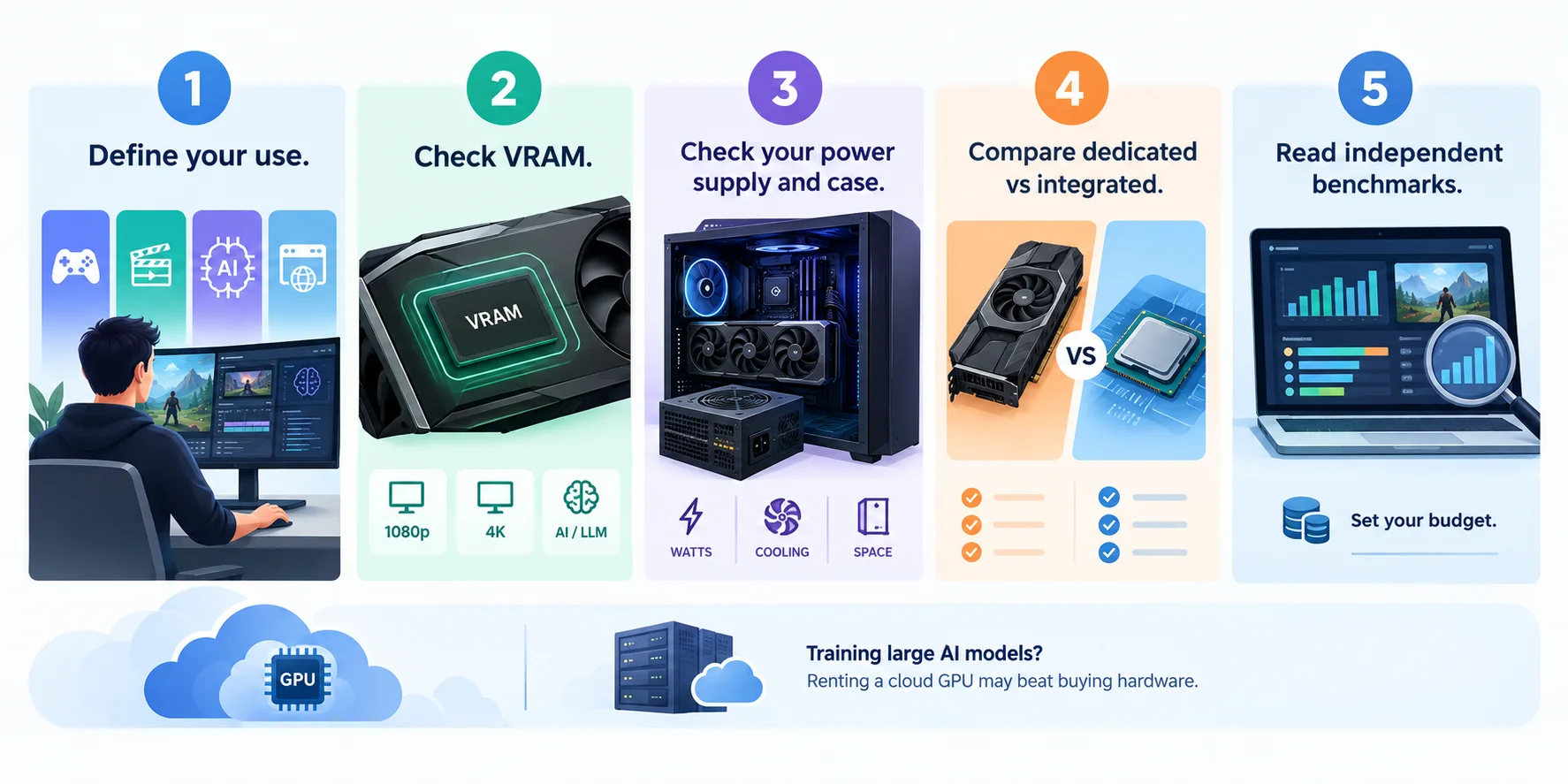
Shopping for a GPU feels overwhelming, I know. There are endless model names, and every brand claims to be the fastest. But a simple process cuts through the noise. Instead of chasing the biggest number, match the hardware to what you actually do. Follow these five steps to avoid overpaying or buying something that can't keep up.
Define your use. Gaming, video editing, AI work, and everyday browsing need very different power.
Check VRAM. Higher resolutions and bigger AI models need more video memory.
Check your power supply and case. A powerful card still needs space, cooling, and enough watts.
Compare dedicated vs integrated. Be honest about whether you need the extra power.
Read independent benchmarks. Compare real results, not marketing slides, then set your budget.
Training large AI models? Renting a cloud GPU may beat buying hardware.
Frequently Asked Questions About GPUs
What does GPU stand for?
GPU stands for graphics processing unit. It's a specialized processor that speeds up graphics and image work, and it now also handles AI and scientific calculations. You'll also see it called a graphics processor. Don't confuse it with a graphics card, which is the full board that carries the GPU chip.
Is a GPU the same as a graphics card?
No. The GPU is the chip, while the graphics card is the add-in board that holds the GPU, video memory (VRAM), cooling, and display ports. People use the two terms interchangeably, which is why it gets confusing. Think of the GPU as the brain and the card as the brain plus everything it needs.
Do I need a dedicated GPU?
It depends on what you do. For browsing, streaming, and documents, integrated graphics is usually enough, and it saves power and battery life. For gaming, 3D work, video editing, or AI projects, a dedicated GPU gives you much more performance because it has its own memory and power budget, so match the hardware to your workload.
Why are GPUs used for AI?
AI training is mostly huge numbers of matrix multiplications, and those can run in parallel. A GPU's thousands of cores do exactly that, and tensor cores speed up matrix math even further. GPUs also run inference, which means using a trained model to make predictions on new data. That's why they sit at the heart of modern AI hardware.
What is VRAM?
VRAM is video memory reserved for the GPU. It stores textures, geometry, and other graphics data so the GPU can reach it quickly. Dedicated graphics cards have their own VRAM, while integrated GPUs share system memory. You can't add more VRAM later; the amount on a card is fixed, so choose carefully.
Can a GPU replace a CPU?
No. A GPU is great at parallel work but weaker at complex branching code, which is what runs your operating system and apps. That's why the CPU sends instructions and the GPU takes the heavy parallel parts. The two work as a team, and some systems add NPUs or TPUs for specific AI jobs.
Final Thoughts: So, What Is a GPU?
A GPU began as a chip for drawing pictures. Today, it's one of the most important parts of modern computing, from your gaming PC to the world's biggest AI data centers. If you remember one thing from this guide, make it this: GPUs win by doing many small tasks at once.
Now you know what a GPU is, how it differs from a CPU, a graphics card, a TPU, and an NPU, and how to check or choose one.
Next time someone asks, you can explain it in two sentences. And if this guide helped, send it to a friend who's still confused about graphics cards.