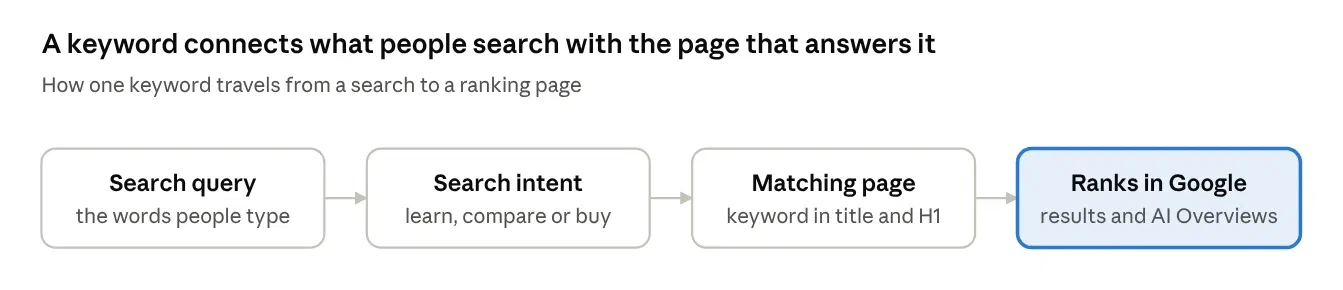
Quick answer: Keywords in SEO are the words and phrases people type into a search engine like Google. When your page uses the same language your audience uses, and answers what they actually want, Google can match it to their search and show it in the results. Keywords are the bridge between what people look for and what you publish.
Most founders I talk to ask me the same question sooner or later.
"We keep hearing we need keywords. But what is a keyword, really? And do they even matter now that Google is so smart?"
It is a fair question. Most guides answer it with one line, a list of keyword types, and a push to buy a tool. You finish reading and still do not know what to do on Monday morning.
So I am going to do it properly. I will explain what keywords are, how Google reads them in 2026, the types that matter, and exactly where they go on a page. I will also walk through one keyword from start to finish, so you can see the whole thing working.
What Are Keywords in SEO?
A keyword is the word or phrase someone types into Google when they want something. In SEO, it is also the phrase you choose to build a page around, so that page shows up when people search for it.
That is it.
Think of a big library with no staff. Millions of books, and you have to find one. The only thing you have is the label on each shelf. Keywords are those labels. They tell Google what your page is about, and they tell the person searching that they have found the right shelf.
One small thing worth knowing. A search query is the exact thing a person types, typos and all, like "best way find keywords for blog free". A keyword is the cleaner version you target, like "free keyword research". Many different queries can map to one keyword.
Do Keywords Still Matter in 2026?
Yes. Keywords still matter, but the way Google uses them has changed.
Years ago, ranking was close to a word-matching game. If your page repeated a phrase enough times, it had a shot. That game is over. Google now uses semantic search, which means it tries to understand the meaning behind a search, not just the words.
Google says this itself. Its SEO Starter Guide tells site owners to think about the words a user might search for, but it also says you do not need to cover every variation, because its language matching can connect a page to searches that do not use the exact terms.
So why do keywords still matter? Because they do three jobs no algorithm can do for you:
They show demand. A keyword tells you people are actually searching for something. Without that, you are writing for nobody.
They show intent. The words people use reveal what they want: to learn, to compare, or to buy.
They shape the page. Your keyword decides your title, your headings, and the questions you answer.
The same is true for AI Overviews and AI chat tools. They still start from a person's question. The pages they pull answers from are the ones that match that question clearly and answer it early. If you want to go deeper on this, we cover it in our post on SEO for AI tools: backlinks vs content.
The 4 Types of Keywords by Search Intent
Every keyword carries an intent, the reason behind the search. If your page does not match that reason, it will not rank, no matter how well it is written. There are four types.
Intent type | What the person wants | Example keyword | Best page to create |
|---|---|---|---|
Informational | To learn or understand something | what are keywords in seo | Blog post or guide |
Commercial | To compare options before buying | best link building agency for saas | Comparison or review page |
Transactional | To buy or sign up now | buy guest post links | Service, pricing or product page |
Navigational | To reach a specific site or page | backlynkflow pricing | Your own branded page |
Here is the easiest way to check intent. Google the keyword and look at the first page. If you see ten guides, Google thinks people want to learn. If you see ten product pages, they want to buy. Build what Google is already rewarding.
Short-Tail vs Long-Tail Keywords
Short-tail keywords are broad, one or two word searches. Long-tail keywords are longer, more specific phrases. Both have a place, but they behave very differently.
Short-tail | Long-tail | |
|---|---|---|
Example | keywords | how to find long-tail keywords for a saas blog |
Search volume | High | Low |
Competition | Very hard | Easier |
Intent | Unclear | Clear |
Who should target it | Big, established sites | New and growing sites |
If your site is new, start with long-tail keywords. Fewer people search them, but the people who do know exactly what they want. That makes them easier to rank for and more likely to turn into leads.
Primary Keywords, Secondary Keywords and Related Terms
Every page should have one primary keyword. This is the main phrase the page is built to rank for. For this article, it is "what are keywords in seo".
Then you add a few secondary keywords. These are close variations that cover the same topic, like "seo keywords" or "types of keywords". One good page can rank for dozens of them at once.
Around those sit related terms, the words that naturally appear when an expert covers a topic. An article about keywords will mention search volume, search intent, and keyword difficulty. You do not need to force these in. If you cover the topic properly, they show up on their own, and they help Google see that your page has real depth.
A Worked Example: One Keyword From Start to Finish
Let me show you how this works on a real-style case. Say you run a project management tool for small agencies.
Start with a seed keyword. "project management software". It is huge, competitive, and full of big brands. Not a good first target.
Narrow it to a long-tail keyword. "project management software for small agencies". Smaller, more specific, and it describes your exact customer.
Check the intent. Google it. The first page is full of comparison lists. So the intent is commercial: people want to compare tools.
Pick the page type. A comparison post, such as "7 Best Project Management Tools for Small Agencies", where your tool sits honestly beside the others.
Choose secondary keywords. "agency project management tool", "project management for creative agencies", "client project tracking software".
Place the keyword. It goes in the title, the URL, the H1, the first 100 words, and a couple of subheadings. More on placement next.
Support it with links. Link to it from your related posts, and earn a few backlinks from agency blogs so Google trusts it.
That is the whole process. Seed, narrow, check intent, match the page, then place and support it.
Where to Put Keywords on a Page
Your primary keyword belongs in a handful of places that Google and readers look at first. You do not need to repeat it everywhere. You need it in the right spots.
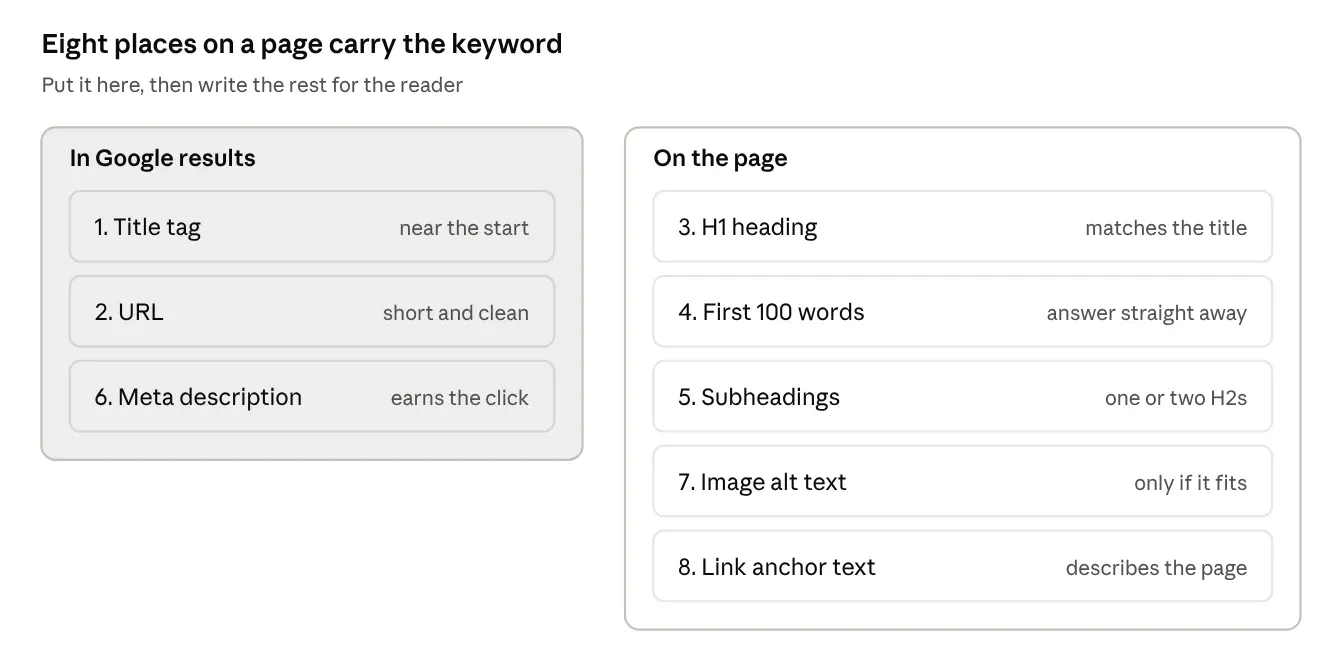
Title tag. The blue headline in Google. Put the keyword near the start and keep it under 60 characters.
URL. Short and clean, like /what-are-keywords-in-seo.
H1 heading. The main heading on the page should match the title closely.
First 100 words. Answer the search straight away, using the keyword naturally.
Subheadings. Use the keyword or a close variation in one or two H2s. Use secondary keywords in the rest.
Meta description. It does not directly boost rankings, but Google bolds matching words, which pulls the eye and earns clicks.
Image alt text. Describe the image honestly. If the keyword fits, use it. If it does not, leave it out.
Internal link anchor text. When other pages on your site link here, the clickable words should describe this page.
After that, write for the reader. If a sentence sounds strange when you read it out loud, the keyword is forced. Rewrite it.
How Keywords Connect to Backlinks
This is the part most keyword guides skip, and it is where we spend our days at BacklynkFlow.
Keywords tell Google what a page is about. Backlinks tell Google that other sites trust it. You need both. A page with perfect keywords and no links often sits on page three. A page with strong links and the wrong keyword ranks for searches nobody makes.
The link between the two is anchor text, the clickable words in a link. When another site links to your page with words that describe its topic, that adds context to your keyword. But it has to look natural. If every link uses the exact same keyword phrase, it looks planned, because it is. A healthy mix includes your brand name, the page title, plain URLs, and descriptive phrases.
Earning those links takes a plan, not luck. If you want to see how we do it, read our guide to building a backlink outreach campaign for authority links.
How to Find Keywords (Start Free)
You do not need an expensive tool to start. Four free sources will give you more keywords than you can use.
Google autocomplete. Type your topic into Google and look at the suggestions. Each one is a real search.
People Also Ask. The question box in the results is a ready-made list of what your audience wants to know. Great for FAQ sections.
Related searches. Scroll to the bottom of the results page for more ideas.
Google Search Console. If your site is live, the Performance report shows the actual queries people used to find you. These are your easiest wins, because Google already connects you to them.
Once you have a list, a paid keyword research tool can add search volume and keyword difficulty scores. Those help you decide which ones to go after first.
One more trick I use all the time: look at what your rivals already rank for. It is the fastest way to find keywords you have missed. Here is our step-by-step guide on how to find competitors' keywords.
3 Keyword Myths You Can Forget
A lot of old advice still floats around. These three cost people the most time.
Myth 1: You need a meta keywords tag. You do not. Google states plainly in its SEO Starter Guide that Google Search does not use the keywords meta tag.
Myth 2: You need LSI keywords. This idea comes from an old indexing method. Google has said publicly that LSI keywords are not something it uses. What actually helps is covering a topic fully, so the related terms appear naturally.
Myth 3: You need a perfect keyword density. There is no magic percentage. Google's guide says repeating the same words over and over is tiring for readers, and that keyword stuffing goes against its spam policies. Use the keyword where it fits and stop there.
Common Keyword Mistakes
Targeting a keyword with the wrong intent. Writing a guide when Google shows product pages, or the other way round.
Chasing only big keywords. A new site rarely ranks for "seo". It can rank for "seo checklist for a new saas website".
Two pages for the same keyword. Your own pages end up competing with each other. Pick one page per primary keyword.
Ignoring the question. Using the keyword in the title but never actually answering it in the content.
Never checking back. Keywords change. Review Search Console every few months and update pages that are slipping.
Frequently Asked Questions
What are keywords in SEO in simple words?
Keywords in SEO are the words people type into Google to find something. Website owners pick the keywords their audience uses and build pages around them, so those pages show up when people search. A good keyword matches both the words and the reason behind the search.
How many keywords should one page target?
One page should target one primary keyword and a few close secondary keywords. If two keywords mean the same thing and show the same Google results, one page can cover both. If the results are different, they need separate pages.
Is keyword density still important for SEO?
No. Keyword density is not a ranking target. Google reads meaning, not percentages, and repeating a phrase too often counts as keyword stuffing under its spam policies. Place your keyword in the title, URL, H1, intro, and a couple of headings, then write naturally.
What is the best type of keyword for a new website?
Long-tail keywords are the best fit for a new website. They are longer and more specific, so fewer big sites compete for them. The people searching them also know what they want, which makes them more likely to read, sign up, or buy.
Do keywords matter for Google AI Overviews?
Yes. AI Overviews still start from the words in a person's question. Pages that match the question clearly and answer it in the first few lines are easier for Google to pull from. Write a direct answer early, then add detail below it.
How does BacklynkFlow use keywords in link building?
BacklynkFlow uses keywords to decide which pages deserve links and what the links should say. We match each target page to its primary keyword, then earn links from relevant sites with a natural mix of anchor text, so the links support the keyword without looking forced.
Are keyword research tools free?
Some are. Google autocomplete, People Also Ask, and Google Search Console are free and use real search data. Paid tools add search volume, keyword difficulty, and competitor data. Start free, then pay for a tool when you need to prioritize a long list.
How long does it take to rank for a keyword?
It usually takes months, not weeks. A long-tail keyword on a site with some authority can move faster. A competitive keyword on a new site can take much longer. Strong content, a clear keyword match, and quality backlinks all shorten the wait.
The Bottom Line
Keywords in SEO are the words your audience types into Google, and they are still the starting point of every page that ranks. Google is smarter now, so the goal is no longer to repeat a phrase. The goal is to pick the right keyword, match its intent, put it in the few places that count, and answer the question better than anyone else.
Get that right, then back it with links from sites Google trusts. If you want help with that second part, talk to the BacklynkFlow team and we will show you where your pages stand.