Quick answer: I find competitors' keywords by pulling their top-ranking pages from a keyword research tool, checking what terms send them traffic, then comparing that list against my own site to spot the gaps I am missing.
I have spent years writing and optimizing content for different niches, and one lesson keeps repeating itself. If I do not know what my competitors rank for, I am guessing at my own strategy. Learning this process changed the way I plan content, because it shows me exactly where the traffic is already flowing and where I still have room to compete.
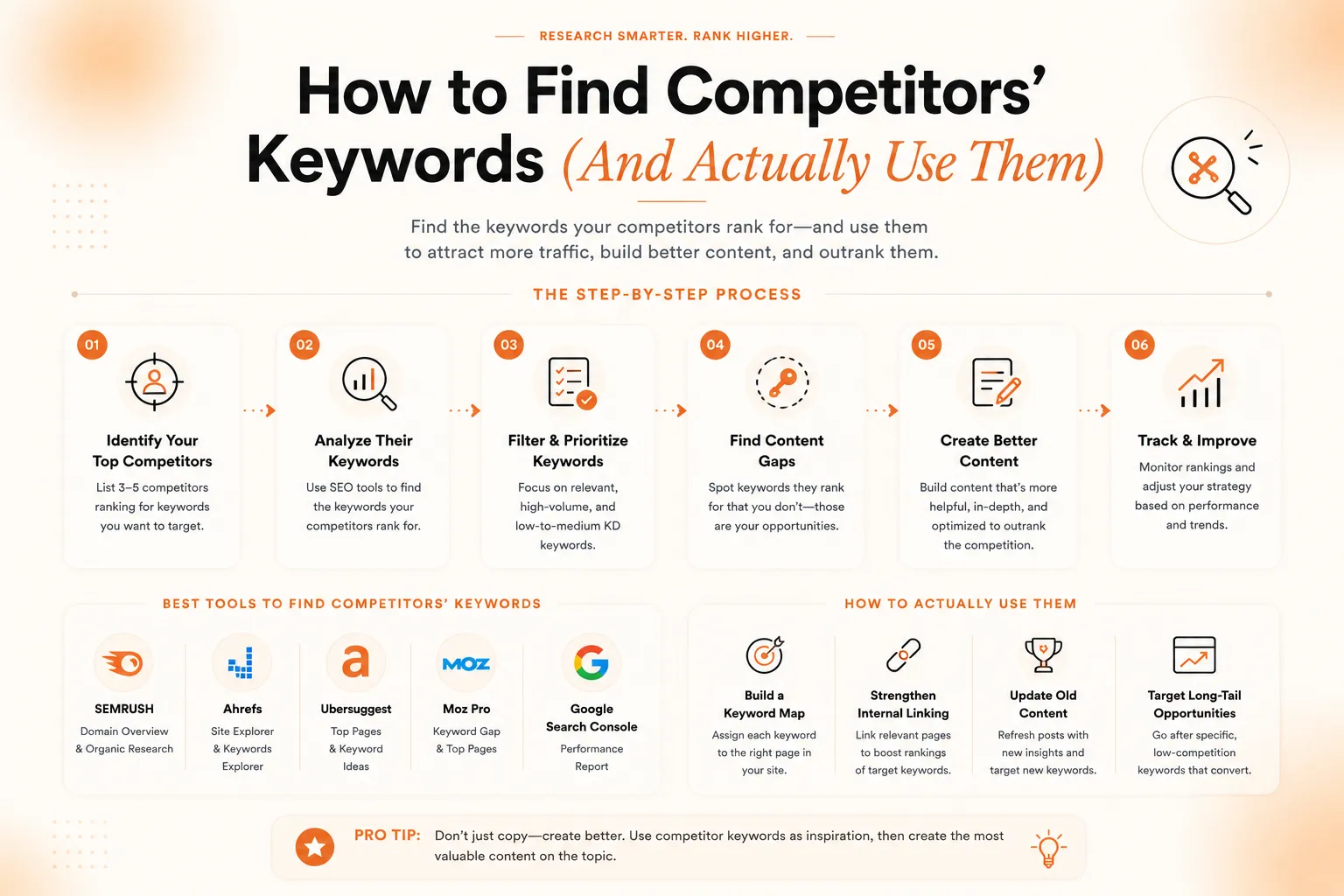
In this guide, I will walk you through the exact steps I use, the free and paid tools worth trying, and how to turn raw keyword data into content that actually ranks. I will also share two tables that break down tool options and a simple keyword gap analysis, so you can follow along and apply this to your own website right away.
Why This Kind of Competitor Research Matters
Every industry has a handful of sites that already rank well. They did not get there by accident. They found search terms with real demand, built pages around them, and earned enough trust from Google to hold their spot. When I study those pages, I am not copying anyone. I am learning what searchers actually want.
This approach is also faster than starting from zero. Instead of brainstorming topics in a vacuum, I look at what is already working in my space. This one habit alone has saved me dozens of hours of guesswork over the years, and it consistently points me toward topics with real search volume behind them.
There is a business reason too. Search engines like Google publish guidance on how ranking works, and relevance to a real search query sits at the center of it. Competitor research is simply a shortcut to understanding what "relevant" looks like in your niche, instead of guessing at it alone.
Step 1: Identify Who Your Real Competitors Are
Before I try to pull any data, I make a short list of the sites actually competing with me in search results, not just brands I know by name. I search my main topics in Google and note which domains show up again and again on page one. Those are my real competitors for that keyword set.
I keep this list short, usually three to five sites. A longer list makes the research messy and harder to act on. I also revisit this list every few months, since rankings shift and new sites enter the space over time.
One thing I watch for here is the difference between a true competitor and a brand that simply outranks me on one unrelated query. A site can beat me for a single term without competing with me in any real sense. I only add a domain to my list once it shows up across several of my core topics, not just one lucky ranking.
Step 2: Pull Their Top Pages and Keywords
Once I have my list, I use a keyword research tool to see which pages on each competitor site get the most organic traffic. Most tools will show the terms tied to those pages, along with search volume and ranking position. This is the core of the process, and it works far better than guessing manually at every term.
I pay close attention to pages ranking in positions two through ten. Position one pages are useful too, but the ones just below often reveal keyword opportunities, since those spots are not fully locked down yet and can move with the right content.
Step 3: Check the SERP by Hand
Tools give me data, but I always double check by searching the keyword myself. I look at the page titles, the format Google favors such as a list, a guide, or a comparison, and the intent behind the query. This manual step is one I never skip, because it tells me things a spreadsheet cannot, like tone, structure, and what searchers expect to see first.
Reading the actual search results by hand is one of the simplest, free ways to find competitors' keywords without paying for anything. It takes more time than a tool, but it costs nothing and often reveals patterns automated reports miss entirely.
Free vs Paid Ways to Research Competitor Keywords
Both approaches work, and I usually combine them. The table below breaks down what each option is good for, so you can pick based on your budget and how deep you need to go with the research.
Method | Cost | Best For |
Manual SERP review | Free | Understanding intent and content format |
Site search operators (site:, intitle:) | Free | Spotting specific pages and topics fast |
Google Search Console (your own site) | Free | Comparing your current rankings to gaps |
Keyword research tools | Paid, some free tiers | Bulk keyword lists, volume, and difficulty scores |
Google Keyword Planner | Free with an ad account | Search volume estimates and related terms |
I do not think one method beats the other. Free methods are slower but cost nothing, while paid tools save time once your content library grows. When I am short on budget, I lean on manual review and Search Console first, then add a paid tool once the site has enough content to justify it.
Step 4: Build a Keyword Gap List
This is where things get useful. A keyword gap list simply shows which terms your competitors rank for that you do not. I build this by exporting competitor keyword lists, then comparing them against my own site's ranking keywords side by side in a simple sheet.
Here is a simplified example of what that comparison looks like once you lay competitor terms next to your own site's current rankings.
Keyword | Competitor Ranking | My Site Ranking | Opportunity |
link building for SaaS | Position 4 | Not ranking | High |
how to earn editorial backlinks | Position 7 | Position 22 | Medium |
white hat link building service | Position 3 | Not ranking | High |
best link building strategy 2026 | Position 9 | Position 15 | Medium |
Once I see gaps like these, the next step is clear. I either write new content for the terms I am missing entirely, or I improve existing pages that are close but not quite strong enough to compete on page one yet.
Step 5: Prioritize by Intent, Not Just Volume
I used to chase every keyword with a high search volume. That was a mistake. Now I filter by intent first. A keyword with lower volume but clear buying intent is often worth more than a high volume term that only attracts casual browsers who never convert.
When I sort competitor terms through this filter, I split them into three buckets: informational, commercial, and transactional. I prioritize commercial and transactional terms if my goal is leads or sales, and I save informational terms for building topical authority over time, since those still bring in steady traffic.
I also weigh how realistic each term is for my site right now. A brand new page rarely beats an established competitor on a highly competitive keyword within the first few months. So I mix a few ambitious terms with several easier ones, which keeps momentum going while the bigger targets slowly climb.
Step 6: Turn Keywords Into Content, Not Just a List
A keyword list on its own does nothing. I always map each term to a specific page, either a new one or an existing one I plan to update. I write with the searcher's actual question in mind, answer it clearly near the top, then expand with more detail further down the page.
I also try to cover angles competitors left out. If every ranking page skips pricing, timelines, or a common objection, I address it directly on my own page. That gap is usually the easiest way to outrank a page that otherwise looks strong on paper.
This is also where I lean on resources like Google's own SEO starter guide to double check that the page structure, headings, and internal links all support the keyword I am targeting, not just the words on the page.
Common Mistakes I Try to Avoid
A few habits make this process weaker than it needs to be. I stuff keywords unnaturally into sentences instead of writing normally. I chase every term a competitor ranks for instead of the ones that actually fit my site and audience. I also forget to revisit this research, when in reality competitor rankings shift constantly and last year's gap list can go stale fast.
The other mistake I see often is stopping at the keyword list. Research without action does not move rankings on its own. The value only shows up once you publish and refine content around what you found in the first place.
I also try not to treat this as a one time project. Search results move constantly, new pages get published, and older content gets updated by competitors too. Treating competitor research as an ongoing habit, even a quick monthly check, keeps my gap list accurate instead of relying on data that is months out of date.
How This Connects to Link Building
Keywords get you into the conversation, but rankings for competitive terms usually need backlink support too. This is where I bring in BacklynkFlow. Once I know which terms matter, I focus my link building efforts on the pages targeting those exact keywords, rather than spreading links thin across the whole site.
BacklynkFlow builds editorial backlinks through manual outreach, with no shortcuts and no low quality link networks. Pairing solid research on how to find competitors' keywords with a steady link building plan is, in my experience, the combination that actually moves stubborn terms off page two.
Frequently Asked Questions
Is it legal to look at competitor keywords?
Yes. You are only viewing public search data and public pages, not private information of any kind.
How often should I redo this research?
I revisit my main keyword gaps every two to three months, since rankings and competitors change more often than people expect.
Do I need a paid tool to find competitors' keywords?
No. Manual SERP review and Google Search Console can get you started for free, though paid tools speed up the process once you scale.
What should I do after I find the keywords I am missing?
Map each term to a page, write content that answers the query clearly, and support it with backlinks where the competition is strongest.
Final Thoughts
Learning how to find competitors' keywords is not complicated once you break it into steps. Identify real competitors, pull their top pages, check the SERP by hand, and build a gap list you can actually act on. From there, content and links do the rest of the work.
If you want help closing the backlink side of this equation, BacklynkFlow can build the editorial links your priority pages need to compete for the terms you just uncovered. Reach out to BacklynkFlow when you are ready to turn your keyword research into real rankings on Google.