A reverse proxy is a server that sits in front of your web servers, receives every visitor request, and forwards it to the right backend server. Along the way it can cache content, handle SSL termination, spread traffic through load balancing, and hide your origin server from attackers. Think of it as your website's front desk.
Okay, that's the short version.
Now let's make it stick. By the end of this guide, you'll know how it works, which tool to pick, and how to set one up in about fifteen minutes.
What Is a Reverse Proxy, Exactly?
Let's start with the basics, because the term sounds scarier than it is. A reverse proxy is a proxy server that stands between the internet and your web servers. Visitors talk to the proxy. They never talk to your real server directly. That one design choice unlocks better server security, faster pages, and easier scaling.
Picture a hotel reception desk.
Guests don't wander into the kitchen. They check in first, and staff route their requests. Same idea.
MDN notes that reverse proxies can hide the identity of servers, while forward proxies can hide the identity of clients. That's the key difference, and it's worth remembering.
Reverse Proxy vs. Forward Proxy vs. Load Balancer
People mix these terms up all the time. Honestly, I don't blame them, because the names overlap and the jobs blur together. But getting them straight will save you from buying or configuring the wrong thing.
Here's the quick comparison:
Feature | Forward Proxy | Reverse Proxy | Load Balancer | API Gateway |
|---|---|---|---|---|
Works on behalf of | Clients | Servers | Servers | API services |
Main goal | Privacy, filtering, access control | Security, caching, SSL, routing | Spread traffic, keep uptime | API management, auth, routing |
Who sets it up | The user or their network | The website owner | The website owner | The API team |
Hides | Client identity | Server identity | Server identity | Backend services |
Typical example | Corporate web filter | NGINX, Cloudflare | AWS ALB, HAProxy | Cloud API gateway |
One thing trips people up, so let me be clear. A load balancer is really a type of reverse proxy, as Kemp explains. All load balancers are reverse proxies. Not all reverse proxies are load balancers.
How Does a Reverse Proxy Work?
Now for the fun part. The process takes milliseconds, and your visitors will never notice it. But understanding the request flow helps a lot when something breaks, and something always eventually breaks. I'll keep this painless.
Here's the flow:
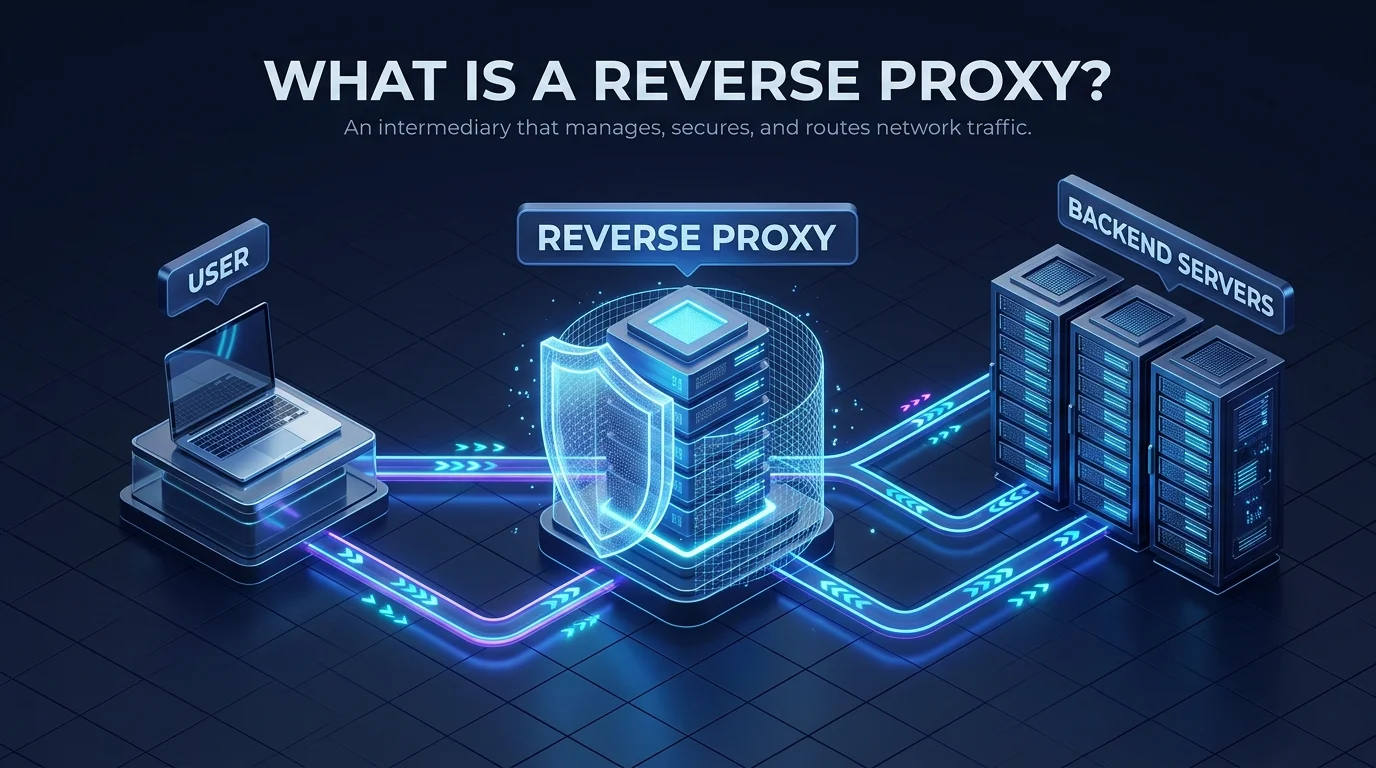
Visitor → Reverse Proxy → Backend Server
Visitor ← Reverse Proxy ← Backend Server
Step by step:
A visitor types your URL.
DNS sends them to the reverse proxy, not your server.
The proxy checks its rules and its cache.
It forwards the request to the right backend server.
The server replies to the proxy.
The proxy returns the response to the visitor.
There's one catch, though. Your backend now sees the proxy's IP, not the visitor's. The Forwarded header from RFC 7239 fixes this by letting proxies pass along the original client details. The broader rules for proxies and gateways live in RFC 9110.
What Are the Benefits of a Reverse Proxy?
So why bother? Because a reverse proxy solves problems that cost you traffic, money, and sleep. It's not a gadget you can skip. For a busy site, it's closer to a must have. Let me break down the big wins.
Faster Pages With Caching and Compression
Speed matters for rankings, and visitors hate waiting. A reverse proxy can cache frequently requested files and serve them instantly. Your server stops rebuilding the same page again and again. Zscaler calls this web acceleration. Add compression, and pages get even lighter. Better speed also supports your Core Web Vitals.
Stronger Security and DDoS Protection
Attackers only see the proxy. Your origin server stays out of sight, which shrinks your attack surface in a big way. The proxy can also soak up DDoS traffic and filter junk requests before they reach your app.
SSL Termination and Easier HTTPS
Instead of every backend server handling HTTPS encryption, the proxy does it once. You manage a single SSL certificate in a single place. Backend servers save CPU, and you save headaches.
Not sure how certificates actually get trusted by browsers? This explainer on the SSL certificate chain walks you through it.
Load Balancing and Scalability
Got several servers? The proxy spreads traffic across them so none gets overwhelmed. During a traffic spike, that's the difference between "site is fine" and "site is down."
Which Reverse Proxy Tool Should You Choose?
Choosing a tool feels overwhelming at first. There are lots of options, and every blog says something different. So let me simplify it. Most people end up with one of the tools below, and the right pick mostly depends on how much work you want to do yourself.
Tool | Type | Best for | Notes |
|---|---|---|---|
NGINX | Self hosted | General websites and apps | Event driven design, simple |
Apache (mod_proxy) | Self hosted | Teams already running Apache | Uses |
HAProxy | Self hosted | Heavy load balancing | Known for reliability and speed |
Traefik | Self hosted | Containers and Kubernetes | Kubernetes native reverse proxy |
Envoy | Self hosted | Large service based systems | Popular in modern infrastructure |
Managed | Small sites and fast setup | Reverse proxy plus CDN and protection |
Running containers? Your traffic often flows from a load balancer to an ingress controller, which is itself a reverse proxy, then to your services. If you're new to that world, start with what a Docker container is and how it works.
How to Set Up a Reverse Proxy With NGINX (Step by Step)
Ready to build one? Great. This is easier than it looks. You need a server, a backend app, and roughly fifteen minutes. I'm using NGINX because it's free and widely documented. You can follow the same logic with Apache.
Before You Start
You'll need:
A Linux server with NGINX installed
A backend app running locally, for example on port 3000
A domain pointed at your server
The Steps
Open your NGINX site config file.
Add a
locationblock.Use the proxy_pass directive to point at your backend.
Pass the headers your app needs.
Test the config, then reload NGINX.
Here's a minimal example:
nginx
server {
    listen 80;
    server_name example.com;

    location / {
        proxy_pass http://127.0.0.1:3000;
        proxy_set_header Host $host;
        proxy_set_header X-Forwarded-For $remote_addr;
        proxy_set_header X-Forwarded-Proto $scheme;
    }
}
Run nginx -t to check for errors. Then reload. That's it. Your reverse proxy is live.
Common Reverse Proxy Mistakes to Avoid
Let's be real for a second. A reverse proxy adds power, and it also adds risk if you set it up carelessly. The scary part is that a bad setup often looks perfectly fine until somebody exploits it. So here's what to watch for.
Trusting forwarded headers blindly. If your app believes a spoofed X-Forwarded-For header, attackers can fake their IP address. That exact problem caused CVE-2024-47070, an authentication bypass in authentik. The fix is simple. Always overwrite the header at your proxy and only trust known proxy addresses.
Ignoring protocol level settings. A large scale NDSS study of the PROXY protocol found over 10,000 servers vulnerable to access bypass, and researchers reached more than 500 internal servers. Misconfiguration is the cause, not the technology.
Creating a single point of failure. If your lone proxy goes down, everything behind it goes dark. Plan for failover with a second proxy.
Forgetting the extra hop. Every request passes through one more stop. Done well, caching more than makes up for it.
Frequently Asked Questions About Reverse Proxies
Is a reverse proxy the same as a load balancer?
Not quite. A load balancer is a type of reverse proxy focused on spreading traffic across servers. A reverse proxy can also cache, compress, and terminate SSL, even with only one backend server.
Does a reverse proxy improve SEO?
Indirectly, yes. Caching and compression speed up your pages, and faster pages support better user experience and Core Web Vitals. A proxy won't rank you by itself, though.
Is a reverse proxy the same as a CDN?
No, but they're related. A CDN is a network of servers that often works as a reverse proxy at the network edge. Cloudflare, for example, combines both.
Is a reverse proxy secure?
It can be. It hides your origin server and filters traffic. But a sloppy configuration, especially around forwarded headers, can create new holes.
Which is better, NGINX or Apache?
Both work well. NGINX is a popular pick for simple, fast proxy setups. Apache makes sense if you already run it and want to use mod_proxy.
Should You Run Your Own or Use a Managed Reverse Proxy?
Here's my honest take. You can run NGINX yourself, and plenty of people do. But you'll patch it, monitor it, tune it, and fix it when it misbehaves. That's real time, and time is expensive.
If you run a business site or a growing blog, I'd start with a managed option.
Cloudflare is the one I'd look at first. It puts a reverse proxy, a CDN, caching, SSL, and DDoS protection in front of your site, and you control it from one dashboard. Your origin server stays hidden. Your pages load faster. And you stop babysitting config files at midnight.
So don't wait for the slow page, the outage, or the attack.
Put your site behind Cloudflare's reverse proxy today and protect and speed up your site before the next traffic spike hits.
Conclusion: Why a Reverse Proxy Is Worth It
A reverse proxy hides your servers, speeds up your pages, handles encryption, and spreads traffic. That's a lot of value for one tool. Learn the basics, pick the right software, avoid the header mistakes above, and you'll have a faster, safer site.