A test query for flag propagation check means flipping a throwaway feature flag, then asking for its value on a loop until it changes, and timing the gap. Run it from every server and client layer, repeat it several times, and log the results. That gives you your real feature flag propagation delay instead of a guess.
You flip a switch in your dashboard. You refresh the app. Nothing changes.
Annoying, right?
Let me show you how to measure that gap, why it happens, and how real teams deal with it. No fluff. Just a process you can copy today.
What Is a Test Query for Flag Propagation Check?
Let me keep this simple. A test query for flag propagation check is a small, repeatable request that asks your app or SDK for a flag's value, again and again, right after you change it. Think of it as a ping for configuration. You change the flag, you ask the same question on a loop, and you note the exact moment the answer flips. Measurement, not magic.
Quick honesty moment: "flag propagation check" isn't an official standard term. It's my shorthand for a habit that vendors and engineering teams describe in different words. So the definition is mine, while the mechanics below come from the sources I link.
Why Flag Propagation Latency Deserves Your Attention
Here's the thing. Most days, flag changes feel instant. Then one day they don't. A rollout stalls, a kill switch feels sluggish, or half your servers act differently from the other half. Flag propagation latency is the time between your change and the new behavior showing up everywhere. If you never measure it, you're guessing in the exact moments you can't afford to guess.
Key Facts at a Glance
Skimming? Good. Before the deep dive, here's a compact list of the dated, sourced facts this guide leans on. Each one links to the original page, so you can verify it yourself and cite it in your own docs. I'll refresh this list whenever vendors publish new information, so check the date at the top.
February 26, 2026: Harness reported delayed propagation for flags updated between 21:14 and 23:39 UTC, while SDK evaluation kept working.
February 4, 2026: LaunchDarkly released Flag Delivery v2 in early access for its Java server-side SDK, adding two-phase initialization and automatic failover to polling.
Streaming speed: Harness says streaming updates flags in a few hundred milliseconds.
Release gap: A GitLab proposal suggests about 24 hours between enabling a flag on staging and in production.
Standards: OpenFeature defines a vendor-neutral flag evaluation API.
How Feature Flag Updates Travel Before Your Check Runs
Before you test anything, you need a mental map. A flag change doesn't teleport. It leaves the dashboard, passes through a delivery layer, reaches an SDK, and often sits behind a cache before your code evaluates it. Each hop can add delay. The table below sums up the three paths, so you know where to look when your results come back slower than expected.
Path | How it works | Common delay source | What to test |
|---|---|---|---|
Streaming | Platform pushes changes to your servers | Dropped connections, delivery backlog | Time until the value flips |
Polling | SDK asks for changes on a schedule | Your polling interval | Flip time compared with the interval |
Caching | Stored values are reused | Multi-layer caches, values cached in code | Value after cache expiry or re-login |
Streaming With Server-Sent Events
Streaming is the fast lane, and most modern platforms lean on it. Instead of your app asking "anything new?" over and over, the platform pushes the change the moment it happens. That's why updates can feel almost instant. Still, "almost" is doing heavy lifting in that sentence, which is exactly why you test.
LaunchDarkly uses server-sent events, a one-way real-time messaging protocol, to notify your servers when flag rules change.
Polling as the Fallback
Not every setup streams. Some SDKs poll, which means they ask the flag service for changes on a schedule. It's simpler, but it adds a built-in delay tied to your polling interval. In practice, that interval becomes the floor for your results, so you'll want to know it before you interpret a single number.
The Harness docs note that in polling mode you choose the interval yourself. That's the heart of the streaming vs polling trade-off: fewer moving parts, but slower, steadier updates.
Caches, Caches Everywhere
Then come the caches. Even when delivery is fast, your own stack can serve an old answer. SDKs cache rules locally, apps cache values, and sometimes several layers stack together. That's the sneaky part of cache invalidation: the flag is already updated, but the thing answering your question hasn't heard yet.
GitLab engineers put it plainly in a merge request: because of a multi-layered cache, the old value can persist for a bit before everything settles. Your own code can cause this too. Reflectoring warns that storing a flag value before a loop means you can't switch it off mid-loop.
Step-by-Step: How to Run Your Test Query for Flag Propagation Check
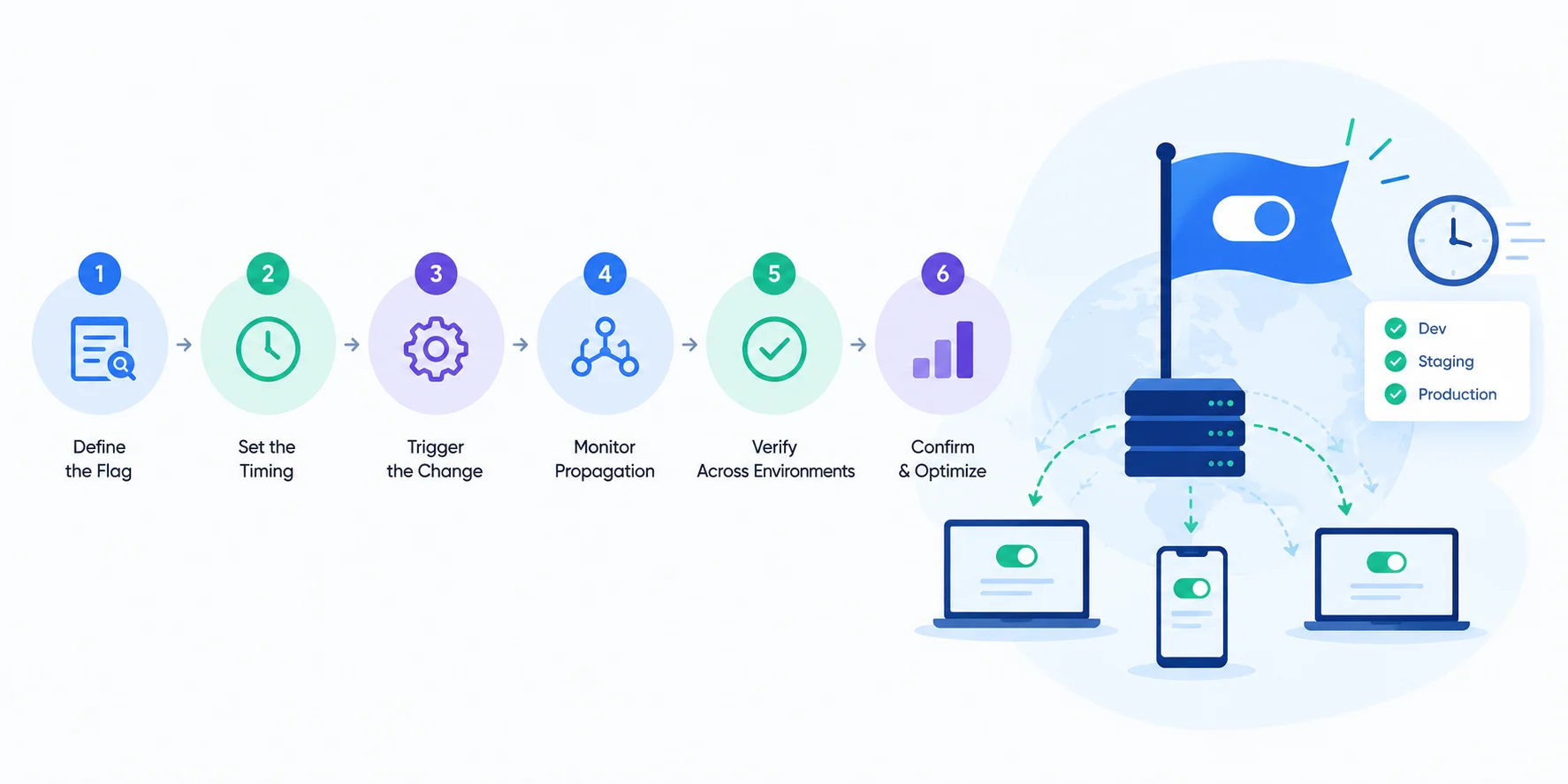
Ready? Here's the exact routine I'd follow. You don't need fancy tooling. You need a flag you control, a way to query it, and a timer. Work through the steps in order, and write your numbers down. If you want a wider process around this, pair it with your QA testing guide.
Step 1: Create a Dedicated Test Flag
Don't test with a real flag. Seriously. Create a throwaway boolean that controls nothing important, and name it so nobody mistakes it for production logic. Clear names matter, and Reflectoring argues a flag's name should say plainly what it does. A dedicated flag keeps your feature flag testing safe and your results clean.
Step 2: Record Your Baseline
Next, ask for the flag's current value from the place you care about: a server, a client, a background worker. Write down the value and the time. This baseline proves your query works and shows you the "before" state. Without it, you can't tell a real change from a lucky guess.
Step 3: Flip the Flag and Start the Clock
Now change the flag in your dashboard or API, and note the exact timestamp. Use one clock for everything, ideally the same machine or synced clocks. Sloppy timestamps ruin propagation measurements faster than any network hiccup. Change one thing only, so you know what caused what.
Step 4: Query Until the Value Changes
Here's the heart of the test query for flag propagation check. Run your query on a short loop, about once a second, and log each answer with its timestamp. The moment the value flips, stop. The gap between your change and that flip is your propagation time. Run it several times, because one lucky run proves nothing.
t0 = now()
flip_flag("propagation-test", true)
while get_flag("propagation-test") != true:
    sleep(1)
print("propagated in", now() - t0)
Step 5: Check Every Layer
A single query only tells you about a single place. So repeat the check from each layer that matters: one server process, a second instance, and your browser or mobile client. If results differ, you've found where the delay lives. Remember GitLab's note that old values can linger across processes before settling.
Step 6: Reset and Log Your Results
Finally, flip the flag back and confirm the reverse change propagates too. Rollbacks matter as much as rollouts. Then save your numbers where your team can see them. Copy the template below into a doc or spreadsheet, fill it in after each run, and you'll have your own benchmark within a few runs.
Run | Environment | Layer (server, client, worker) | Flip time (seconds) | Notes |
|---|---|---|---|---|
1 | ||||
2 | ||||
3 |
Test Both Flag States, Not Only the Switch
Propagation speed is half the story. The other half is whether your code behaves correctly on each side of the flag. Stably recommends two tests for every flag with user impact: one with the flag OFF to confirm legacy behavior still works, and one with it ON to confirm the new behavior works. Add these to your feature flag best practices checklist.
A few habits make this stick:
Reset flag overrides after each test, so one test can't poison the next.
Check that cached flag values refresh after a re-login, as the Stably guide suggests.
Target your internal teammates and automation bots inside the flag, a tactic Harness recommends for testing in production before a wider release.
Cover every value a flag can hold, including strings and invalid ones, not just true and false.
What Real Teams Do About Propagation Delay
You're not the first person to hit this problem. Engineering teams have built habits around it, and you can borrow them. The best ones share a theme: they assume delay will happen, and they design the release process around that fact. For more on this mindset, see our release management guide.
Add a Time Gap Between Environments
The GitLab proposal I mentioned asks for a gap between enabling a flag on staging and in production, long enough for a full end-to-end suite run to finish and get reviewed. It also says the restriction should be overridable. Smart, because emergencies exist.
Monitor Propagation Itself
After its incident, Harness listed better monitoring for propagation latency and stronger alerting for propagation backlog thresholds among its follow-ups. Take the hint. Your test query for flag propagation check shouldn't be a one-off. Run it on a schedule, and you'll spot slowdowns long before a release depends on them.
Mistakes That Skew Your Results
Even a simple check can mislead you. These traps are easy to fall into, and each one produces numbers that look fine while hiding a real problem. Read the list, then compare it against your own setup before you trust any result. A bad measurement is worse than none, because it feels like proof.
Testing one process only. One fast server doesn't prove the fleet is fast.
Trusting a stale flag value. If your code caches the value, your query measures your cache, not the platform.
Confusing evaluation with propagation. The Harness incident showed evaluation can work while updates lag.
Borrowing someone else's numbers. One interview-prep site, TechInterview, cites under one second for 99% of SDK instances. Treat that as a design target, not a promise.
Skipping the default value. Know what your code does when the platform can't answer.
Where OpenFeature Fits In
If you use more than one flag vendor, or might switch someday, OpenFeature deserves a look. It's an open specification for a vendor-agnostic flag evaluation API. The SDK talks to an external evaluation engine, but it doesn't handle evaluation logic itself.
Two pieces matter for you. First, the evaluation context carries ambient data used for targeting, so your test queries can mimic real users. Second, the OpenFeature Remote Evaluation Protocol standardizes how apps talk to flag systems. In practice, you can write your check once against the API and reuse it across providers.
Frequently Asked Questions
What Is Feature Flag Propagation Delay?
Feature flag propagation delay is the time between changing a flag and every part of your system serving the new value. It comes from the delivery pipeline, polling intervals and caches. Harness documented one such delay on February 26, 2026, when updates were slow to distribute even though SDK evaluation kept working. Measure it in your own stack rather than assuming.
How Long Should Flag Propagation Take?
There's no universal number. Harness says streaming updates flags in a few hundred milliseconds, while polling can't beat your configured interval. One interview-prep site cites under one second for 99% of SDK instances, but that's a design target, not a measurement. Run your own test query for flag propagation check and set an internal limit from the results.
Should I Use Streaming or Polling?
Streaming pushes changes the moment they happen, so it's usually faster. Polling asks on a schedule, so it's simpler but slower, bounded by your interval. Many setups combine both: LaunchDarkly's early-access FDv2 for its Java SDK can fail over to polling when streaming drops. Test whichever path your SDK actually uses.
Why Does My Flag Still Show the Old Value?
Usually a cache. SDKs, apps and other layers can hold an earlier value until they refresh. GitLab engineers note that a multi-layered cache can keep old behavior briefly before values settle. Your own code can do it too: reading a flag once before a loop means later iterations ignore changes. Check each layer separately to find the culprit.
How Often Should I Run the Check?
Run it whenever you change delivery settings, SDK versions or release gates, and on a schedule so slowdowns surface early. Harness listed stronger propagation-latency monitoring and backlog alerts after its incident, which is the same idea. A weekly automated run is a sensible starting point; adjust it once you see your own numbers.
Final Thoughts: Make Propagation Boring
Here's what I want you to remember. A test query for flag propagation check is simple: flip a throwaway flag, query in a loop, time the flip, repeat across layers. Do that regularly, and flag delays stop being scary surprises.
Pair it with ON and OFF tests, a time gap between environments, and monitoring. That's progressive delivery you can trust.
So which flag will you test first? Pick one today, run the six steps, and write down your number. You'll learn more in ten minutes than in ten hours of guessing.