Quick answer: A terabyte (TB) equals 1,000 GB in decimal terms (the standard manufacturers use) or 1,024 GB in binary terms (the standard your operating system uses). That's the whole confusion in one sentence — but let me show you exactly why it matters and how to use it.
I still remember the first time I bought a "1 TB" hard drive and plugged it in — only to see my computer tell me I had 931 GB. I panicked a little. Did I get scammed? Nope. You've probably had this exact moment too, and that's exactly why I'm writing this guide.
If you've ever typed "how many GB in a TB" into Google at 2 AM while trying to figure out if your new SSD is big enough, you're in the right place.
By the end of this post, you'll know exactly how gigabytes (GB) and terabytes (TB) relate to each other, and you'll never have to Google this again. Let's dive in.
What Is a Terabyte, Really?
Okay, before the math — let's slow down for a second. A terabyte isn't abstract tech jargon. It's just a unit for measuring digital storage capacity, the same way a "mile" measures distance. Once you get that, everything else clicks.
A terabyte is a big chunk of data storage, way bigger than a gigabyte, and it's typically used to describe things like external hard drives, cloud storage plans, and enterprise servers.
According to Proton's storage guide, hardware manufacturers define 1 TB as 1,000 GB, following the decimal system (also called the SI standard). That's the "clean" number you see on packaging.
But computers don't always agree with that number. More on that in a second.
(Related read: if you're comparing drive types, check out our guide on SSD vs HDD storage before you buy.)
How Many GB in a TB? (The Short Answer, Explained)
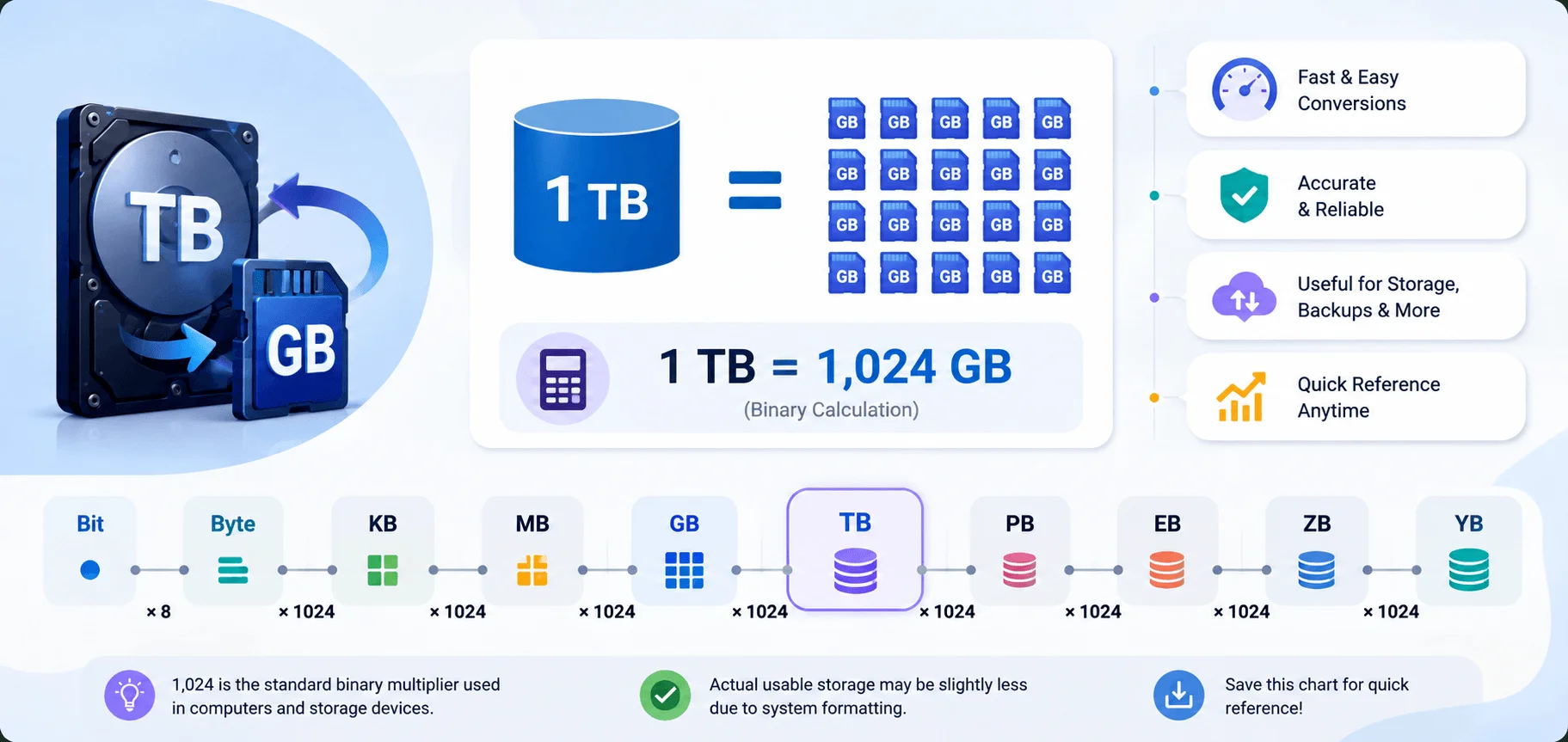
You already have the number from the top of this post. Here it is again, broken down:
Decimal (marketing) standard: 1 TB = 1,000 GB
Binary (computer/OS) standard: 1 TB = 1,024 GB
Two systems, two correct answers. Let's unpack why both exist.
The Decimal System (What You See on the Box)
Storage manufacturers — think Seagate, Western Digital, Samsung — use base-10 math. In this world:
1 kilobyte = 1,000 bytes
1 megabyte = 1,000,000 bytes
1 gigabyte = 1,000,000,000 bytes
1 terabyte = 1,000,000,000,000 bytes
This is the SI (International System of Units) approach. It's clean and easy to calculate. That's why it's used for marketing storage devices.
The Binary System (What Your Computer Actually Uses)
Here's the twist. Computers think in twos, not tens, because that's how binary code works under the hood.
So your operating system calculates storage using powers of 1,024. This is the JEDEC standard, and it looks like this:
1 kibibyte (KiB) = 1,024 bytes
1 mebibyte (MiB) = 1,024 KiB = 1,048,576 bytes
1 gibibyte (GiB) = 1,024 MiB = 1,073,741,824 bytes
1 tebibyte (TiB) = 1,024 GiB = 1,099,511,627,776 bytes
Those "i" letters come from the IEC binary prefix system — kibi, mebi, gibi, tebi. It was designed to end the confusion. It didn't fully work. Most software still just labels everything "GB," no matter which math it's using underneath.
Why Does My 1 TB Drive Show Only 931 GB?
I get why this drives people crazy. Here's what's happening, step by step:
You buy a drive advertised as 1 TB.
The manufacturer means 1,000,000,000,000 bytes — the decimal definition.
You plug it into Windows or macOS.
Your OS converts that number using binary math, dividing by 1,024 three times.
The screen shows 931 GB.
Per Pro Calculator UK: 1,000,000,000,000 bytes ÷ 1,024³ = 931.32 GiB. Same drive. Same bytes. Two counting systems, one shared label.
Nobody stole your storage. Your OS just does binary math and calls the result "GB" instead of the technically correct "GiB." Annoying? Yes. A scam? No.
xConvert notes the two systems diverge by roughly 7.4% — and that gap widens as storage size grows. At petabyte scale, this mismatch can throw off a real budget, like one for a data center migration.
GB to TB Conversion Chart (Quick Reference)
Bookmark this table — it's faster than doing the math yourself.
Gigabytes (GB) | Terabytes — Decimal | Terabytes — Binary |
|---|---|---|
100 GB | 0.1 TB | 0.0977 TiB |
250 GB | 0.25 TB | 0.244 TiB |
500 GB | 0.5 TB | 0.4883 TiB |
1,000 GB | 1 TB | 0.9766 TiB |
1,024 GB | 1.024 TB | 1 TiB |
2,000 GB | 2 TB | 1.9536 TiB |
Simple rule: divide by 1,000 for decimal, divide by 1,024 for binary.
How to Convert GB to TB (Step-by-Step Guide)
Here's exactly how to do it, whether you're a math person or not.
Step 1: Decide Which System You Need
Comparing advertised storage on a product page? Use decimal. Checking what your operating system displays? Use binary.
Step 2: Apply the Right Formula
Decimal formula: GB ÷ 1,000 = TB
Binary formula: GB ÷ 1,024 = TB
Step 3: Plug in Your Numbers
Say you've got 750 GB of files and want to know how much of your 1 TB drive that uses.
Decimal: 750 ÷ 1,000 = 0.75 TB
Binary: 750 ÷ 1,024 = 0.732 TiB
Step 4: Double-Check With a Converter
For quick everyday use, try an online GB to TB converter instead of doing the math by hand. It's faster and removes room for error — especially useful for big cloud storage migrations. (If you're looking to streamline your workflow further, our guide to the best productivity Chrome extensions of 2026 is worth a look too.)
Real-World Examples of GB and TB Storage
Numbers on a page are one thing. Seeing them in context is when it clicks.
Smartphones
Most modern phones range from 64 GB to 512 GB, with flagship models now pushing a full 1 TB of internal storage, per Pro Calculator UK. Heavy photo or video shooters will notice that extra headroom fast.
If you're deciding between a tablet and laptop for note-taking and storage needs, check out our roundup of the best iPad note-taking apps.
Laptops and Desktops
Consumer laptops typically ship with SSDs from 256 GB to 2 TB, while desktop setups with multiple drives often total 1 TB to 10 TB combined.
External Hard Drives
This is where terabytes shine. Some consumer HDDs now hold up to 18 TB, and the largest SSDs on the market reach 100 TB.
Cloud Storage Providers Compared
Here's something most guides skip: how popular cloud services actually define their storage. This matters because not every provider rounds the same way.
Provider | Free Tier | Paid Plan Example | System Used |
|---|---|---|---|
Google Drive | 15 GB | 2 TB (~$9.99/mo) | Decimal (1,000 GB) |
iCloud+ | 5 GB | 2 TB (~$9.99/mo) | Decimal (1,000 GB) |
Dropbox | 2 GB | 2 TB (~$11.99/mo) | Decimal (1,000 GB) |
Microsoft OneDrive | 5 GB | 1 TB (~$6.99/mo) | Decimal (1,000 GB) |
Proton Drive | 5 GB | 1 TB (~$9.99/mo) | Binary (1,024 GB) |
Notice Proton Drive is the outlier — it uses the binary (JEDEC) system, so a "1 TB" Proton plan genuinely gives you 1,024 GB, not 1,000. It's a small detail, but it's the kind of thing that's worth knowing before you commit to a subscription.
GB vs TB vs Other Storage Units (Full Hierarchy)
Let's zoom out and see the entire byte hierarchy — from tiny to massive.
Bit — smallest unit, a single 0 or 1
Byte — 8 bits, roughly one character of text
Kilobyte (KB) — ~1,000 bytes
Megabyte (MB) — ~1,000 KB
Gigabyte (GB) — ~1,000 MB
Terabyte (TB) — ~1,000 GB
Petabyte (PB) — ~1,000 TB
Exabyte (EB) — ~1,000 PB
Per this data units guide, each step up is roughly 1,000x bigger than the last. A petabyte could hold something like 500 billion pages of plain text.
One more thing worth remembering: storage is measured in bytes (capital B), while internet speed is measured in bits (lowercase b). If your ISP advertises "100 Mbps," that's only 12.5 MB/s in real download speed, since 1 byte equals 8 bits. This trips up a lot of people when they first get into networking. (For more on managing your home network, see our guide on how to change your WiFi password.)
Why This Matters for Your Buying Decisions
This isn't just trivia. Understanding how many GB are in a TB helps you make smarter buying decisions.
Whether you're:
Choosing a cloud storage plan
Buying an external hard drive
Comparing SSD vs HDD capacity
Budgeting for enterprise data storage
...knowing the difference between decimal and binary storage means the "usable capacity" won't catch you off guard. That's the real reason people search this question in the first place — they want clarity, not more confusion.
Frequently Asked Questions
Is 1 TB equal to 1,000 GB or 1,024 GB?
Both, technically. It depends on whether you're using decimal (1,000 GB, used by manufacturers) or binary (1,024 GB, used by most operating systems).
Why does my computer show less storage than advertised?
Your OS uses binary math to calculate storage, while manufacturers use decimal math to advertise it. Nothing's missing — it's two different counting systems.
Is a TB or a GB bigger?
A terabyte is bigger — much bigger. 1 TB equals roughly 1,000 GB, so a terabyte holds about 1,000 times more data than a gigabyte.
How much storage do I actually need?
It depends on your use case. 128–256 GB is plenty for basic use, but video editing, gaming, or large media libraries call for 1 TB or more.
Which cloud storage provider gives the most for "1 TB"?
Proton Drive, since it uses the binary system — a "1 TB" Proton plan is actually 1,024 GB, slightly more than the 1,000 GB you get from Google Drive, iCloud, Dropbox, or OneDrive.
Final Thoughts
So — how many GB in a TB? It depends on the system doing the counting. Decimal gives you 1,000 GB. Binary gives you 1,024 GB. Once you understand that distinction, the "missing storage" mystery disappears completely.
I hope this guide finally cleared up the confusion for you. Next time you buy a drive and see a number that doesn't quite match the box, you'll know exactly why — and you can explain it to your friends like the storage nerd you now are.