The best cloud storage services comparison for 2026 comes down to four things: price per terabyte, free tier size, whether encryption is on by default, and what it costs you to leave. Google Drive wins on collaboration. Proton Drive and Sync.com win on privacy. IDrive wins on raw price. Backblaze B2 wins for developers. I'll walk you through all of it below, including the one cost almost nobody puts in their comparison table.
Here's the thing.
Most "best cloud storage" posts you'll find are a list of logos with a price next to each one. Useful for about ninety seconds. Then you sign up, upload 400GB of photos, and discover the encryption you thought you were paying for only applies to one special folder you never used.
I don't want that to happen to you. So this comparison is built around the questions that actually change your decision.
What Search Intent Tells Us About This Comparison
Before I get into providers, one quick note on why this article is structured the way it is. When you type cloud storage comparison into Google, you're not looking for a definition. You're in what SEOs call commercial investigation intent: you've decided you need storage, and now you're narrowing the field. That means you want tables, real prices, and a verdict. Not a 600-word history of the cloud. I've matched the format to that intent, and I'd suggest you do the same on your own site.
Google's Helpful Content guidance rewards that kind of intent match. AI Overviews reward it even harder, because answer engines extract structured comparisons before they extract prose.
So: tables first, opinions second.
The six criteria I compared on
I scored every provider on the same six things. Price per TB per month, free tier size, zero-knowledge encryption scope, sync quality, ecosystem fit, and exit cost. That last one is the criterion missing from nearly every roundup, and it's the one that bites hardest at 2TB and above.
Why exit cost belongs in every comparison
Signing up is designed to be frictionless. Leaving is not. Transfer quotas, daily download caps, and per-gigabyte egress fees are all disclosed somewhere, but almost never in the comparison table you actually read. I've pulled them into their own section further down, and into a standalone cloud storage exit cost table you can bookmark.
The Quick Comparison Table
Let me give you the whole picture in one screen, then I'll break down the interesting ones individually.
Prices verified 24 August 2026. US list prices, annual billing where offered. Check the vendor's own page before you buy, because Google is currently folding Google One into its AI plans and tier names are moving around.
Service | Free tier | Headline paid plan | Zero-knowledge by default? | Best for |
|---|---|---|---|---|
Google Drive | 15 GB (shared) | 2 TB, $99.99/yr | No | Docs, Sheets, real-time collaboration |
Microsoft OneDrive | 5 GB | 1 TB, $99.99/yr with Office | No | Windows households |
Apple iCloud+ | 5 GB | 2 TB, $9.99/mo | Partial | iPhone photo backup |
Dropbox | 2 GB | 2 TB, $9.99/mo annual | No | Sync reliability, sharing |
pCloud | 10 GB | 2 TB, $99.99/yr or $399 lifetime | Opt-in only | Media, one-time payment |
Sync.com | 5 GB | 2 TB from ~$8/mo | Yes | Cheapest encrypted GB |
Proton Drive | 5 GB | From ~$4.99/mo | Yes | Privacy ecosystem |
Tresorit | 3 GB | ~$11.99/user/mo | Yes | Regulated business |
MEGA | 20 GB | 2 TB, ~€99.99/yr | Yes | Biggest free encrypted tier |
IDrive | 10 GB | ~$2.00/TB/mo | No | Cheapest cloud backup service |
Backblaze B2 | 10 GB | ~$6.95/TB | No | Developers, object storage |
Scan that for a second. Notice how tightly the mainstream tier clusters? According to the Cloud Storage Price Index 2026, iCloud+ and Google One both sit at $9.99 a month for 2TB, with Dropbox and Amazon at $11.99. That's roughly half a cent per gigabyte across the board.
Which means price barely separates them. Something else has to.
Cloud Storage Pricing Comparison: What You're Actually Paying
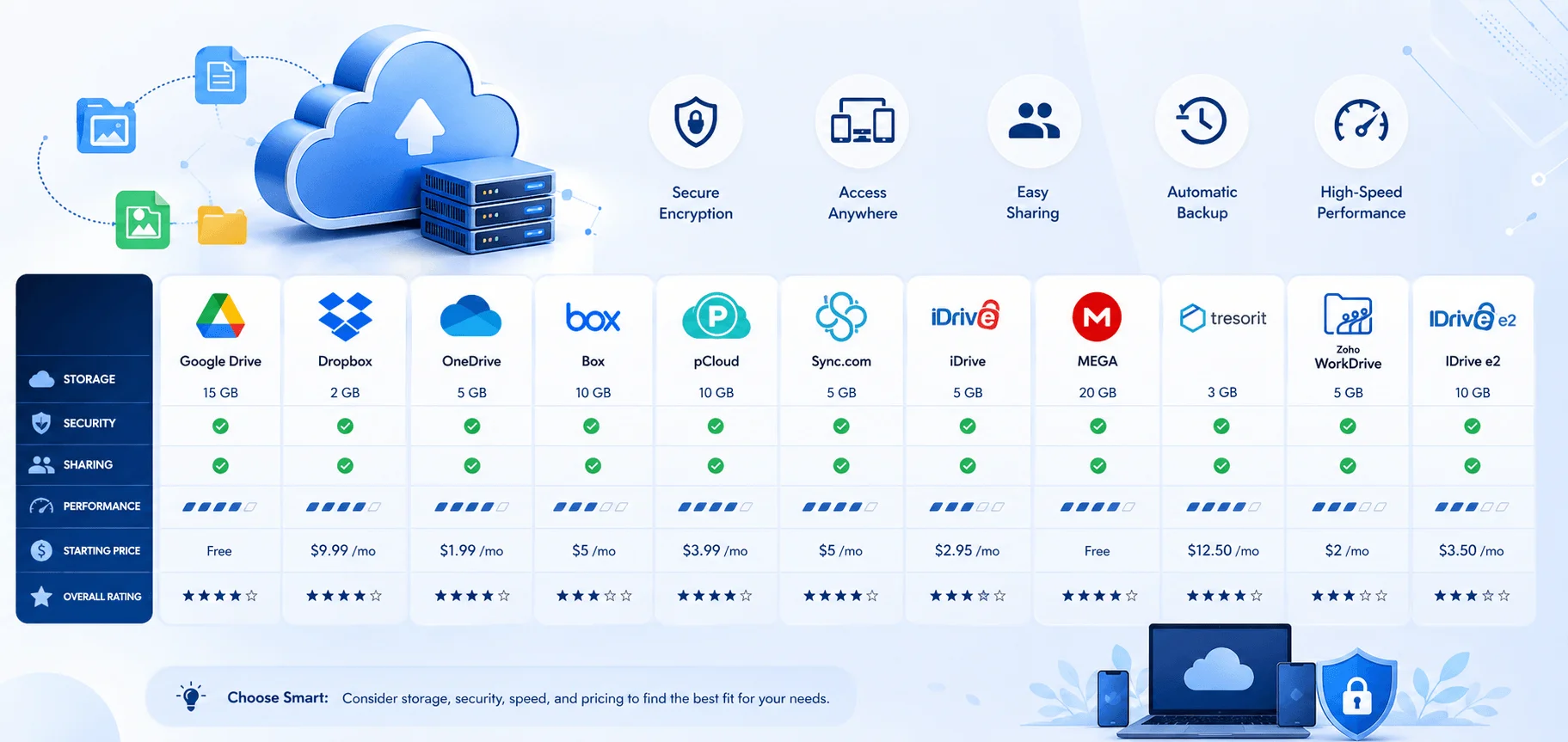
I want to slow down on money for a moment, because the headline number is the least useful figure on any pricing page. Your real bill is storage plus retrieval plus transfer plus time. And time is the sneaky one: you're not buying storage, you're renting it, and the rent runs for as long as your photo library exists. The same price index calculates that ten years of 2TB on iCloud or Dropbox works out to roughly $1,200. That reframing changed how I think about lifetime cloud storage plans.
Speaking of which.
Is a lifetime plan worth it?
pCloud's 2TB lifetime plan runs $399 one time, versus $99.99 a year on the subscription. Do the math and you break even at about four years. If you're storing a family photo archive that will outlive three laptops, that's a straightforward yes. If you're storing work files for a company that might not exist in 2029, it's a coin flip.
I lean yes for personal archives. I lean no for anything business-critical, because a lifetime plan is only as long-lived as the vendor.
Best value at the 2TB tier
If you're purely optimizing cost per TB, CloudsLinker's July 2026 pricing audit puts the budget tier at TeraBox (roughly $1.63/TB/month) and IDrive ($2.00/TB/month). If the per-terabyte math is new to you, my guide on how many GB are in a TB explains why a "2TB" plan doesn't always show 2,000GB in your account.
Google One and pCloud sit in the mainstream value slot at about $4.17/TB/month. OneDrive is the priciest per terabyte at $8.33, but you're buying Microsoft 365 with storage attached, so the comparison flips entirely if you'd have paid for Word and Excel anyway.
The family plan shortcut
Households should look at bundle plans before individual ones. Microsoft 365 Family covers up to six people for $129.99 a year versus $99.99 for a single seat. That's the single biggest price per GB per month saving available to most families, and it's covered in more depth in my family cloud storage plans guide.
Zero-Knowledge Encryption: The Distinction Nobody Explains
Okay, this is the section I most want you to read. Encrypted cloud storage is marketed as one thing, but there are two completely different models hiding behind the same phrase, and the gap between them decides what happens to the files you upload without thinking.
Model one: zero-knowledge on every file, on every plan. Your files are encrypted on your device before they leave it, filenames and folder structure included. The server only ever holds ciphertext. Proton Drive, Tresorit, Sync.com, MEGA, Internxt and Filen work this way.
Model two: opt-in folder. The account is server-side encrypted by default, meaning the provider holds the keys and can technically read your files. End-to-end encryption applies only to a separate, usually paid folder you have to remember to use. pCloud's Crypto add-on and Icedrive's Encrypted folder work this way.
Default versus opt-in. That's the whole ballgame, and I break down the mechanics in my zero-knowledge encryption explainer.
Does the encryption actually hold up?
Marketing claims are one thing. Adversarial testing is another. In October 2024, researchers at ETH Zurich published a cryptanalysis of several zero-knowledge cloud storage providers. As summarized by Privacy Stronghold, the study found severe protocol-level flaws in Sync.com, pCloud, Icedrive and Seafile, including file injection and metadata manipulation. Tresorit came out comparatively well, with the researchers noting its design was mostly unaffected thanks to more careful choices of cryptographic primitives.
That doesn't make the others unsafe for ordinary use. Both Proton Drive and Sync.com have strong implementations and independent audits of their own. But it's the kind of evidence that beats a marketing page, and it's worth knowing before you trust a service with tax records.
What zero-knowledge doesn't protect
Two caveats. First, MEGA's headline 20GB free tier uses AES-128 rather than AES-256 encryption. Bigger tier, weaker cipher. Second, zero-knowledge protects file contents, not the fact that an account exists, when you logged in, or how much you store. Metadata still leaks.
Jurisdiction matters too
Where the company is incorporated decides which government can compel it. Proton and Tresorit are Swiss. Sync.com is Canadian. If you're weighing data sovereignty or GDPR compliance, that's not a footnote, it's a primary criterion. For HIPAA compliant cloud storage specifically, Tresorit and Proton lead, with ISO 27001 certification and regular external audits behind them.
Egress Fees and the Cost of Leaving
Here's the part that separates this comparison from the other twelve tabs you have open.
Getting data in is free everywhere. Getting it out is not.
On consumer services, the trap is quotas and caps rather than fees. MEGA enforces a transfer quota even on paid tiers, which will stall a migration mid-flight. Free Dropbox caps daily downloads. Those limits don't appear on a pricing page, but they absolutely appear on the weekend you try to switch providers.
On business object storage, it's straight money.
What moving 1TB really costs
Amazon S3 Standard stores at roughly $0.023/GB but charges $0.09/GB in egress. CloudsLinker calculates that moving a single terabyte out costs about $83, versus $0 on Cloudflare R2, Wasabi and Backblaze B2 within allowance. Oracle's OCI includes 10TB a month free, then $0.0085/GB, per Finout's 2026 pricing breakdown.
Spendark's cost guide puts the headline finding bluntly: at 100TB with heavy egress, total cost across major providers can differ by more than 7x. Same data. Same year. Seven times the bill.
The two fees that compound it
Data retrieval fees apply on cold and archive tiers, and API request pricing applies to PUT, GET and LIST operations. Wasabi also enforces a 90-day minimum retention, so deleting early doesn't save you anything.
Worth watching: the EU Data Act's egress fee ban takes full effect on 12 January 2027. That will reshape this table.
Consumer Storage vs Object Storage: Which Do You Need?
Quick clarification, because the search results for this topic mix two completely different products. If you're storing family photos, shared documents and phone backups, you want consumer sync storage: Drive, Dropbox, pCloud, Proton. If you're storing application assets, datasets, logs or backups that code reads and writes, you want S3-compatible storage: B2, Wasabi, R2, S3 itself.
They're not competitors. Plenty of setups use both.
Object storage is also the fastest-growing category in the market right now. MarketsandMarkets projects it expanding at roughly 19.1% annually, against an overall cloud storage market it values at about $173 billion for 2026, growing to $380 billion by 2031.
How to Choose: A Step-by-Step Cloud Storage Services Comparison Guide
Let me make this concrete. Follow these five steps in order and you'll land on the right service in about twenty minutes rather than three evenings.
Step 1: Measure what you actually store. Check your current usage before you shop. Most people buying 2TB are storing 400GB. Buy for eighteen months out, not for the fantasy archive.
Step 2: Pick your ecosystem first, storage second. If your documents live in Google Docs, the Microsoft bundle is software you won't open. If you're on Windows with Office, OneDrive's storage is effectively free. Ecosystem fit beats price at these margins.
One practical note before you commit to Apple's tier: know how to get out. Storage subscriptions renew silently, so bookmark how to cancel a subscription on iPhone before you start a paid trial.
Step 3: Decide whether you need encryption by default. Tax records, client files, medical documents, legal work? Default zero-knowledge, no exceptions. Vacation photos and recipe PDFs? Server-side encryption is fine, and you get better real-time collaboration for it.
Step 4: Read the exit terms before you read the price. Find the transfer quota, the download cap, and the egress rate. Write them down. That's your switching cost in three years.
Step 5: Test drive on the free tier. Upload 5GB. Time it. Try selective sync, file versioning, and a shared link with a password. Test it with real files, including iPhone photos, since HEIC handling varies by provider. If yours won't preview them, convert HEIC to JPG first and re-test.
Don't skip your backup strategy
One last nudge. Cloud sync is not backup. If you delete a file and it syncs, it's gone from every device at once. The 3-2-1 backup rule still applies: three copies, two media types, one offsite. Pair a sync service with a dedicated cloud backup service like IDrive, turn version history on, and read my cloud backup vs cloud sync comparison if the distinction is still fuzzy.
Frequently Asked Questions
Which cloud storage has the most free space?
MEGA's 20GB is the largest no-strings free tier. TeraBox advertises 1TB free, but CloudsLinker notes it's ad-supported and speed-capped.
Is Google Drive or OneDrive better?
Google Drive for collaboration and cross-platform work. OneDrive if you use Windows and Microsoft 365, since the Office suite comes bundled at the same $99.99 annual price.
What's the difference between cloud storage and cloud backup?
Storage syncs your current files across devices. Backup keeps historical copies you can restore after deletion, corruption or ransomware.
Are egress fees a problem on consumer plans?
Not directly. Consumer services don't bill per gigabyte out, but transfer quotas and download caps limit how fast you can migrate.
Is cloud storage safe from hacking?
With default zero-knowledge encryption and two-factor authentication, a breach of the provider's servers exposes only ciphertext. Without it, the provider holds keys that can be compelled or stolen.
How much does cloud storage cost per GB?
About half a cent per gigabyte per month at the mainstream 2TB tier, based on July 2026 list prices.
My Verdict
If I had to hand you one recommendation and walk away: Proton Drive for privacy, Google Drive for collaboration, pCloud lifetime for a personal archive you'll keep forever, and Backblaze B2 for anything your code touches.
But run Step 4 first. The provider you can leave cheaply is the one you'll be happiest with in 2029.