An email alias is an alternate email address that delivers straight into your existing inbox — not a separate account with its own login. It works through simple email forwarding: mail sent to the alias gets routed to your real mailbox automatically. Unlike a second email account, an alias needs no new password, no new inbox, and no extra app to check.
That's the short version.
Now let's get into the details — because once you understand how aliases actually work, you'll find a dozen ways to use them to protect your privacy, kill spam, and keep your inbox organized.
Let's dive in.
What Is an Email Alias?
So what exactly is an email alias?
In plain English: an email alias is an alternate email address that delivers straight into your existing inbox.
No new account. No new password. No extra login screen to remember.
Think of it like this: you already have one mailbox. An alias just gives that same mailbox a second name — or a third, or a tenth.
Actually, I love the analogy Brightside AI uses: an alias is basically a PO Box for your digital mail. The outside label looks different, but everything still lands in the same place.
Here's the thing, though.
Most people confuse an alias with a completely separate email account. They're not the same. A separate account has its own inbox, its own login, its own everything. An alias? It's just a mask sitting on top of your real mailbox.
And that distinction matters — a lot — for privacy, spam control, and organization, which I'll get into shortly.
Why This Definition Actually Matters
You might be thinking, "okay, cool, but why should I care?"
Fair question.
Here's why: once you understand that an alias is just a forwarding address, you unlock a whole bunch of use cases — protecting your primary email address, sorting your inbox automatically, and even catching data breaches before they become a nightmare.
I'll walk you through all of it.
How Does an Email Alias Actually Work?
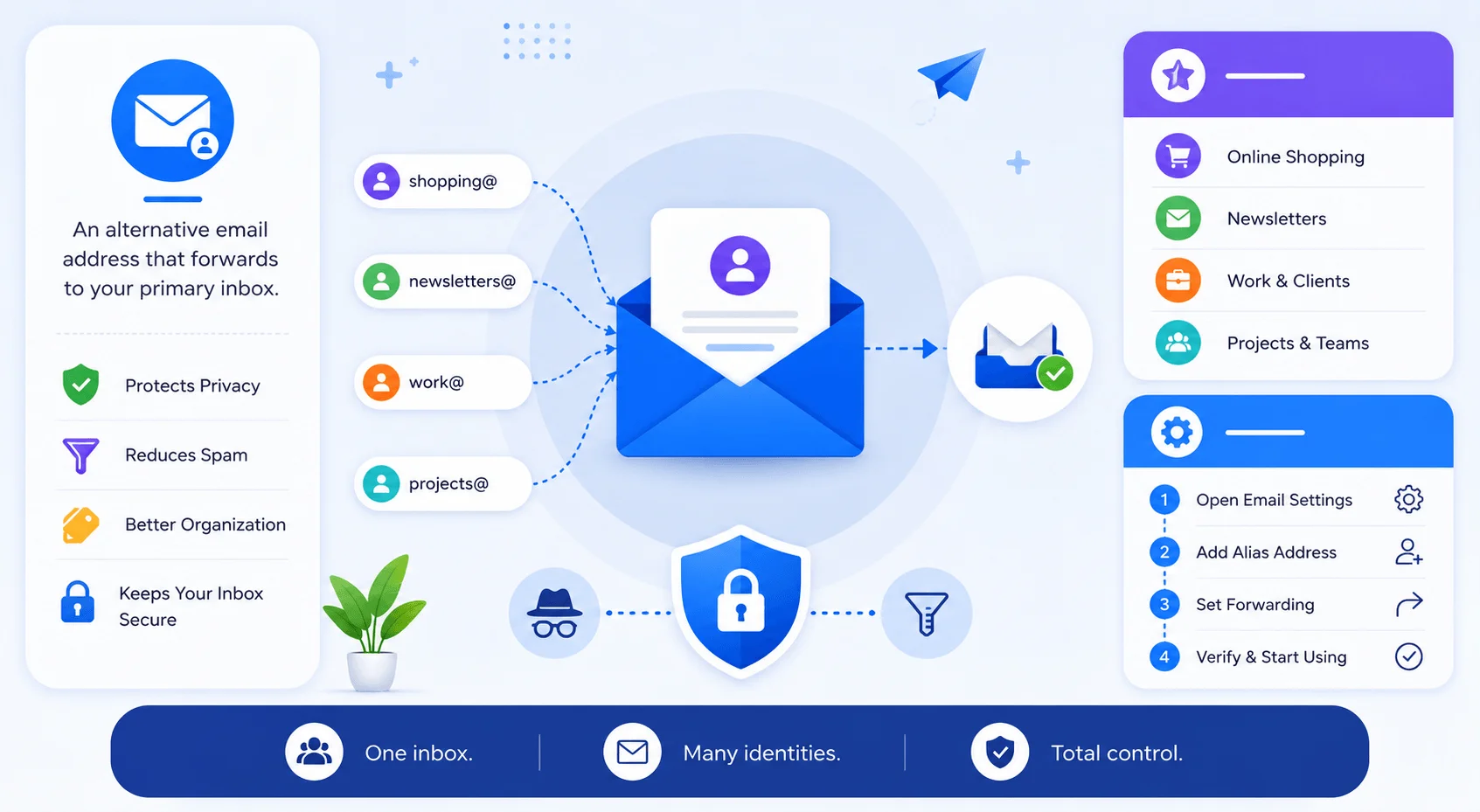
Okay, so now that you know what an alias is, let's talk about how it actually works under the hood. I promise this part isn't as technical as it sounds — I'll keep it simple and practical, because honestly, that's all you really need to start using one.
At a basic level, email forwarding is the engine behind every alias — if you've never set up forwarding in Gmail before, it's worth understanding first since aliases build directly on top of it.
When someone sends a message to your alias, the mail server doesn't create a new mailbox for it. Instead, it just quietly redirects that message into your existing inbox — the same one where all your "real" email already lands.
Kind of sneaky, right? In a good way.
A few important mechanics you should know:
You typically can't log in as the alias directly — receiving mail on it is automatic
Replying from the alias (also called "send-as") usually needs a bit of extra setup
If you skip that setup, your real address can leak into the "From" field when you hit reply
Providers cap how many aliases you can create — for example, Microsoft 365 allows up to 300 aliases on a single account
A Quick Real-World Example
Let's say Jane runs a small consulting business.
Her real inbox is jane.pointsman@consulting.com. But she also sets up:
hello@consulting.com— general inquiriesbilling@consulting.com— payments and invoices
All three addresses land in the exact same inbox. To anyone emailing her, she looks like she's running a full team. In reality? It's just Jane and her one mailbox, wearing three different hats.
That's the magic of role-based aliases — and it's a trick more solopreneurs should be using. (If you haven't set up basic email security yet, that's worth doing first — see our [email security basics guide].)
Email Alias vs. Everything Else (Stop Getting Confused)
This is where most articles online get sloppy — and honestly, it drives me a little crazy.
People throw around terms like "alias," "forwarding," "distribution list," and "disposable email" like they all mean the same thing. They don't. And if you don't understand the difference, you'll end up setting up the wrong tool for the job.
Here's the whole thing laid out at a glance:
Concept | What It Does | Key Distinction |
|---|---|---|
Email alias | Multiple addresses → one inbox | "A and B are both just me" |
Distribution list | One address → fans out to many people | Opposite shape of an alias — one-to-many |
Forwarding | Mail arrives at Address A, then gets resent to Address B | Mail actually lands somewhere first, then moves |
Plus addressing |
| Zero setup, but not private — the |
Disposable email | Short-lived, throwaway mailbox | Built to expire, often after one use |
Masked/relay alias | Randomly generated address (e.g. Apple Hide My Email) | No pattern to guess — best for true privacy |
Catch-all alias | Accepts mail sent to any address on your domain | Invent aliases on the spot, no pre-setup needed |
Let's break each of these down a bit further.
Alias vs. Distribution List
An alias routes multiple addresses into one inbox (many-to-one).
A distribution list does the opposite — it takes one address and fans it out to many people (one-to-many).
So if you're thinking "A and B are both just me" — that's an alias.
If you're thinking "one email needs to reach my whole team" — that's a distribution list.
Alias vs. Forwarding
This one trips people up constantly.
With forwarding, mail actually arrives at one mailbox first, and then gets resent somewhere else. (Here's our full walkthrough on how to forward emails in Gmail if you want the step-by-step.)
With an alias, there was never a separate mailbox to begin with. The mail was always destined for your one and only inbox — it just took a different name to get there.
Subtle difference. Big practical implications, especially when you're troubleshooting delivery issues.
Alias vs. Plus Addressing
Here's a fun one you've probably seen without realizing it.
Plus addressing (also called subaddressing) is when you tack on a +tag before the @ symbol — like yourname+shopping@gmail.com.
Zero setup required. It just works on Gmail and most modern providers.
The catch? It's not private at all. Anyone can strip off the +tag and see your real address underneath. And some signup forms actually reject the plus sign as "invalid," which is annoying.
A true alias, on the other hand, looks completely different from your main address — no obvious pattern to strip away.
Alias vs. Disposable Email
A disposable email address is usually short-lived, built to expire after a single use.
An alias can be disposable too, sure — but many aliases are meant to stick around long-term, especially the ones tied to receipts, password resets, or account alerts you actually want to keep receiving.
Alias vs. Masked / Relay Email
Now this is where things get really interesting for privacy nerds (like me).
A masked or relay alias — think Apple's Hide My Email, SimpleLogin, or Firefox Relay — generates a completely random, opaque address that forwards to you.
Unlike plus addressing, there's no pattern to guess. No real address hiding underneath. It's about as close to true anonymity as email gets.
Alias vs. Catch-All (Wildcard) Alias
Last one, I promise.
A catch-all or wildcard alias accepts mail sent to literally any address at your custom domain — even ones you never explicitly created.
That means you can invent an alias on the spot, right in a signup form, like amazon-shopping-2026@yourdomain.com, and it'll work instantly. No pre-setup needed.
Pretty slick, right?
Why You Should Actually Start Using an Email Alias
Alright, so you understand what an alias is and how it's different from the neighboring concepts. Now let's talk benefits — because this is really where it gets exciting, and honestly, where most people finally go "oh wait, I need this."
Worth noting first: Verizon's Data Breach Investigations Report consistently ranks phishing among the top initial-access techniques used in breaches — and reused, widely-shared email addresses make that easier for attackers. Compartmentalizing with aliases directly reduces that exposure.
Here's why aliases are worth your time:
1. Privacy protection. You hand out an alias instead of your real address on job boards, marketplaces, or public forms — keeping your primary email address out of the wild.
2. Spam containment. If one alias starts getting hammered with junk, you just kill that one. Your main inbox stays spotless.
3. Breach tracing. This one's underrated. Since each site gets a unique alias, if amazon-alias@yourdomain.com suddenly starts getting spam, you know exactly who leaked or sold your data.
4. Better inbox organization. Filter and auto-label by alias — shopping in one folder, newsletters in another, work in a third.
5. A more professional appearance. Running sales@, support@, and billing@ off one inbox makes a solo operation look like a full team.
6. Security isolation. According to All Things Secured, if an alias gets compromised in a data breach, only that alias is exposed — your primary identity stays safe.
Now, I'll be straight with you — aliases aren't a silver bullet.
As Brightside AI rightly points out, an alias is "a privacy layer, not a security replacement." You still need strong, unique passwords and multi-factor authentication on every account. Combine the two, and you've basically built defense in depth for your digital identity.
A Fresh Reason to Care in 2026
Here's something worth flagging: in July 2025, Google began rolling out a "Manage Subscriptions" view inside Gmail, letting people review subscription senders and unsubscribe in one place.
Helpful? Sure. But it's cleanup after the fact — your address has already been shared by the time you're unsubscribing.
Aliases flip that timing. They give you control at signup, before a leak or spam flood even has a chance to happen. That's a meaningfully different (and better) strategy than cleaning up after the mess.
The 5 Types of Email Aliases You Should Know
Not all aliases are created equal. Depending on what you're trying to accomplish, you'll want a different flavor. Let me break down the five main types so you can pick the right one for your situation.
1. Provider-Native Alias
This is the simplest option — built directly into Gmail or Outlook. No third-party tool needed.
2. Plus-Addressed Alias
Fast, free, zero setup — but not very private, as we covered above.
3. Masked / Relay Alias
The gold standard for anonymous email and privacy-first browsing. Random, revocable, untraceable back to you.
4. Custom-Domain Catch-All Alias
Unlimited, human-readable addresses on your own domain. Great if you want full control. (Pairs well with a custom domain email setup — see our [guide to setting up a custom domain] if you haven't already.)
5. Role-Based Business Alias
Perfect for small businesses that want a professional front without paying for five separate mailboxes.
How to Set Up an Email Alias (Step-by-Step)
Okay, let's get practical. Here's exactly how to set one up, no matter which provider you're using.
Step 1: Choose your alias type. Decide whether you want a quick plus-addressed alias, a provider-native alias, or a privacy-focused masked address.
Step 2: Open your provider's settings. For Gmail, click the gear icon → See all settings → Accounts → "Send mail as" → Add another email address.
Step 3: Add the alias. For Outlook or Microsoft 365, go to Account Manager → Your Info → Account Info → Edit Account Info → Add Email.
Step 4: Enable send-as (if you want to reply from it). Without this step, your real address may leak when you hit reply — so don't skip it.
Step 5: Set up filters. Auto-label incoming mail by alias so everything stays organized from day one.
Step 6: Wire it into a password manager. Tools like 1Password, Bitwarden, and Proton Pass can generate an alias and a unique password together — a genuinely great habit to build. (More on this in our [password manager comparison guide].)
Step 7: Audit monthly. Check which aliases are attracting spam, and kill the ones you no longer need.
Frequently Asked Questions
Is an email alias free?
Yes, in most cases. Gmail, Outlook, and Microsoft 365 all let you create aliases at no extra cost, up to a provider-set limit. Some privacy-focused relay services (like SimpleLogin or Firefox Relay) offer free tiers too, with paid plans for unlimited aliases or custom domains.
Is an email alias the same as a second email account?
No. A second account has its own inbox, login, and password. An alias is just an extra name attached to your existing mailbox — mail sent to it lands in the same inbox you already check.
Can I reply from an email alias without exposing my real address?
Yes, but only if you set up "send-as" (or the equivalent) for that alias first. Skip this step, and your real address can leak into the "From" field when you reply.
How many aliases can I create?
It depends on the provider. Microsoft 365 allows up to 300 aliases per account. Gmail doesn't cap "Send mail as" the same way, but heavy use can trigger spam-prevention limits. Custom-domain catch-all setups are effectively unlimited.
Are email aliases actually private?
It depends on the type. Plus-addressed aliases (name+tag@gmail.com) are not private — anyone can strip the tag. Masked/relay aliases (like Apple's Hide My Email) are much closer to truly private, since they're randomly generated and don't reveal your real address.
Do email aliases stop all spam?
No. They contain and help trace spam — you can tell exactly which alias (and therefore which company) leaked your data — but they don't eliminate the underlying problem of data collection and phishing.
Final Thoughts
Look, an email alias isn't some obscure IT trick reserved for sysadmins anymore.
It's a genuinely practical tool that anyone — freelancer, small business owner, or just a regular person tired of spam — can set up in about five minutes.
Once you start compartmentalizing your inbox with aliases, you'll wonder why you didn't do it sooner.
So go ahead, pick a provider, set up your first alias today, and take back control of your inbox.