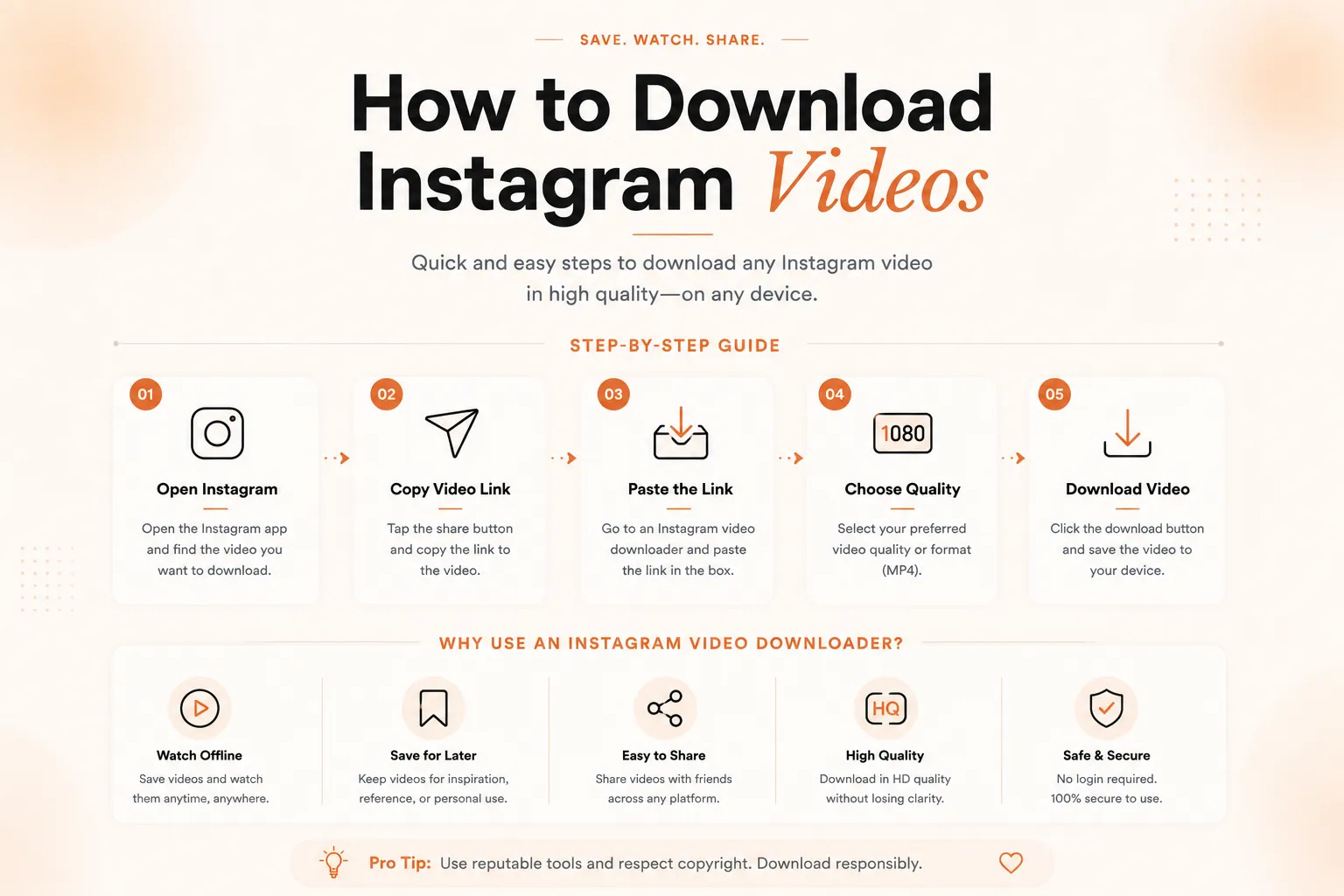
The fastest way to save a clip is to copy the post link, paste it into a trusted downloader tool, and save the file to your device in a few taps.
I get asked this question constantly, so I put together one guide that covers every device and situation you might run into. Whether you're on Android, iPhone, Windows 11, or trying to save a video from someone else's account, I'll walk you through how to download Instagram videos without confusing steps or shady software. This guide breaks things down device by device, explains what actually works right now, and flags what to avoid so you don't waste time or risk your data.
Why So Many People Search for This
Instagram doesn't include a built-in download button for regular posts or Reels, and that catches a lot of users off guard. You can save a post to your own account for later, but that only keeps it inside the app. It doesn't give you a file you can keep, edit, or share outside Instagram.
That gap is exactly why so many people search for how to download Instagram videos every single day, and it's why I wanted to lay out every legitimate option in one place. Once you understand the basic method, the device-specific steps are just small variations on the same idea.
Most of the confusion comes from outdated advice online. Instagram updates its app fairly often, and methods that worked a year ago sometimes stop working overnight. I've kept this guide focused on approaches that hold up regardless of small app changes, since they rely on the link itself rather than a workaround inside the app.
How to Download Instagram Videos on Android
On Android, you have a few reliable routes. The simplest is copying the video's share link from the three-dot menu, then pasting it into a trusted browser-based downloader that lets you save the file directly to your gallery. Screen recording is another option if you just need a quick clip without extra steps.
I'd avoid apps that ask for your Instagram login credentials, since that's a privacy risk with no real benefit over link-based tools. A downloader that only needs the public post link, not your password, is doing exactly what it should and nothing more.
How to Download Instagram Videos on iPhone Without a Watermark
iPhone users often want a clean copy without a logo stamped across the video. The link-and-paste method works the same way here as it does on Android, and most reliable downloader sites will give you a watermark-free file automatically.
I'd steer clear of any tool that asks you to install a configuration profile or grant unusual permissions just to save a video. A watermark-free download shouldn't require handing over more access to your phone than a simple video file needs.
How to Download Instagram Videos on Windows 11 and PC for Free
On a Windows 11 PC, I usually open Instagram in a browser, copy the post link, and use the same paste-and-save approach. Most free downloader tools work directly in your browser, so you don't need to install anything extra.
If a site asks you to download a separate desktop app just to save one video, that's a sign to look elsewhere. The browser-based route is faster, free, and doesn't leave extra software sitting on your PC afterward.
How to Download Instagram Reels
Reels work almost identically to regular videos. Copy the Reel's link from the share menu, paste it into your downloader of choice, and save it in a few seconds. Since Reels are usually shorter, this tends to be the fastest category to work with, and it's the one I get asked about most often.
One thing worth noting is that Reels sometimes include background audio licensed for use only within Instagram. If you plan to reuse the clip somewhere else, it's worth checking whether the audio needs separate clearance before you publish it anywhere public.
Downloading From Someone Else's Public Account
If the account is public, the process doesn't change much. Copy the link to their post the same way you would for your own content, and use a downloader as usual.
If the account is private, you'll need the account owner's permission before saving or redistributing anything they've shared, both out of respect and because it protects you from copyright issues. Private content is private for a reason, and no downloader tool changes that.
Saving Videos From Instagram Messages on PC
Videos sent through Instagram DMs work a little differently since they don't always have a shareable public link. On the desktop, right-clicking the video inside the chat window sometimes gives you a direct save option.
If that's not available, playing the video and using your browser's built-in save or screen capture feature is a reliable backup. Just keep in mind that anything shared privately should stay between you and the sender unless they've said otherwise.
Common Mistakes People Make When Saving Instagram Videos
A lot of frustration comes down to a handful of avoidable mistakes. Using outdated apps that Instagram has since blocked is one of the most common, since old workarounds tend to break first when Instagram updates its platform.
Another common issue is downloading from sites that bury the actual download button under multiple ads or fake buttons. If a site feels more like an obstacle course than a tool, it's worth closing the tab and trying a cleaner option instead.
Skipping the permission step is the mistake with the most real consequences. Downloading is easy. Respecting where that content came from is what actually matters if you plan to use it anywhere outside your own device.
What to Look for in a Reliable Downloader
A good downloader should only ask for the post link, never your account password. It should work directly in your browser without forcing a separate app install, and it shouldn't bury the save button behind ads or pop-ups.
Speed matters too, but not at the expense of your data. If a tool feels rushed or asks for permissions that have nothing to do with saving a video, that's a reasonable signal to look elsewhere.
Method Comparison Table
Device | Method | Cost | Extra App Needed |
Android | Link-and-paste downloader | Free | No |
iPhone | Link-and-paste downloader | Free | No |
Windows 11 / PC | Browser-based downloader | Free | No |
Instagram DMs (PC) | Right-click save or screen capture | Free | No |
Do's and Don'ts Table
Do | Don't |
Use link-based tools that don't ask for your password | Enter your Instagram login on a third-party site |
Save your own content or content you have permission to use | Redistribute someone else's video without asking |
Check that a downloader works in your browser without extra installs | Download unnecessary desktop apps for a single video |
Respect private accounts and DM content | Screenshot or share private messages without consent |
Is It Legal to Download Instagram Videos?
Saving your own content is never an issue since it's yours to begin with. Saving someone else's video for personal use is generally low-risk, but redistributing it, especially for commercial purposes, can raise copyright concerns.
Instagram's own terms of use outline what's allowed on the platform, and it's worth a quick read if you're unsure. Fair use can apply in some cases, like commentary or criticism, but it's a narrow exception rather than a blanket permission slip.
When in doubt, the simplest rule is to ask the creator first. Most people are happy to say yes if you're upfront about how you plan to use their content.
Downloading Instagram Videos on Mac
The process on Mac mirrors what you'd do on Windows. Open Instagram in your browser, copy the post link, and paste it into a browser-based downloader that saves directly to your Downloads folder. There's no need for a separate Mac-specific app since the method relies on the browser, not the operating system.
Safari and Chrome both handle this the same way, so it comes down to personal preference rather than one browser working better than the other. If you're saving videos regularly, bookmarking a downloader you trust saves you from searching for one each time.
Where to Store Your Downloaded Videos
Once a video is saved, keeping it organized makes it easier to find later. On mobile, a dedicated folder or album separate from your personal camera roll keeps downloaded content from getting mixed in with your own photos.
On a PC, a simple folder structure sorted by date or creator works well if you're saving content regularly. Cloud storage is worth considering too, especially if you're switching between devices and want access to the same files everywhere.
Frequently Asked Questions
Can I download Instagram videos on Android without an app?
Yes. A browser-based link-and-paste downloader works without installing anything extra.
How do I download Instagram videos on Samsung phones?
The same link-and-paste method works on Samsung devices since it runs through your browser rather than a specific phone brand.
Can I download a video from someone else's account?
Only if the account is public, or if the account owner has given you permission to save and use their content.
How do I download Instagram videos on Windows 11 for free?
Open the post in your browser, copy the link, and paste it into a free browser-based downloader. No paid software is required.
How do I save a video someone sent me on Instagram Messages on PC?
Try right-clicking the video in the chat window first. If that option isn't available, use your browser's save feature while the video plays.
Can I download Instagram Reels the same way as regular videos?
Yes, Reels use the same share-link process as standard posts, and downloads are usually just as quick.
How do I download Instagram videos on iPhone without a watermark?
Most reliable browser-based downloaders remove the watermark automatically, so you don't need a separate tool for this.
Does downloading a video reduce its quality?
Not usually. Most link-based downloaders save the video at the same resolution Instagram originally uploaded, though very old or heavily compressed posts may look slightly lower quality to start with.
Is there a limit to how many videos I can download?
Most free downloader tools don't cap the number of downloads, though some sites may slow down or ask you to wait briefly between saves.
Do I need to create an account to use a video downloader?
No. Reliable link-based downloaders work without you signing up or logging in, since all they need is the public post link you paste in.
Final Thoughts
Once you know how to download Instagram videos properly, the process takes under a minute on any device. Stick to link-based tools, skip anything asking for your password, and always respect private content and other creators' rights.
This guide was put together by the content team at BacklynkFlow, where we spend our days helping brands build the kind of content and backlinks that actually move search rankings. If you're working on a site that needs the same kind of clear, useful content paired with real link-building results, BacklynkFlow's team handles both the writing and the outreach.
You can learn more about how BacklynkFlow approaches link building for growing brands, or reach out directly if you want a content and SEO strategy built around what your audience is actually searching for. BacklynkFlow's guarantee-backed plans exist for exactly this kind of long-term, search-first content work.
Read Also: Best Laptops for Video Editing in 2026 (My Picks)